

Brand-based recommendations
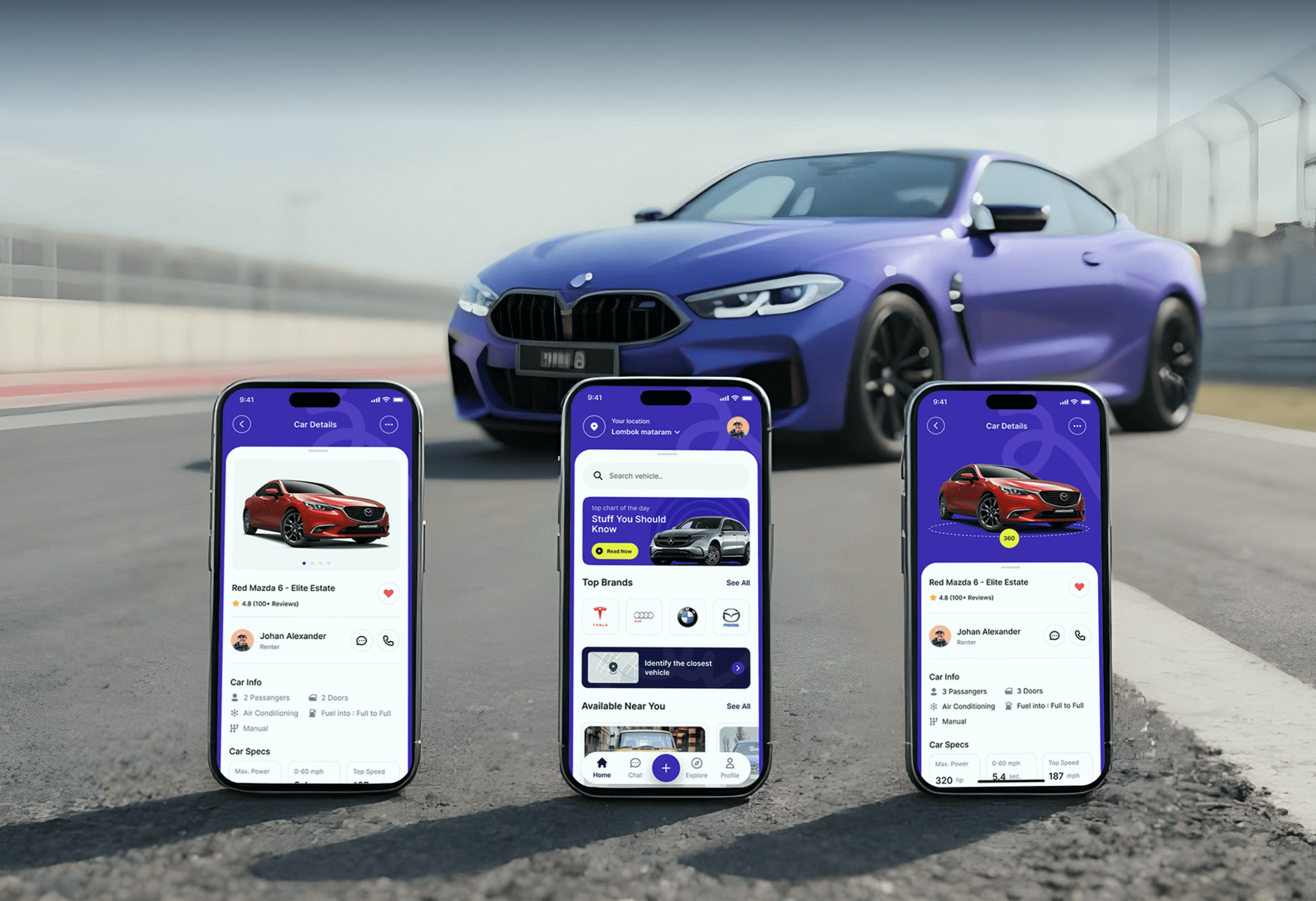
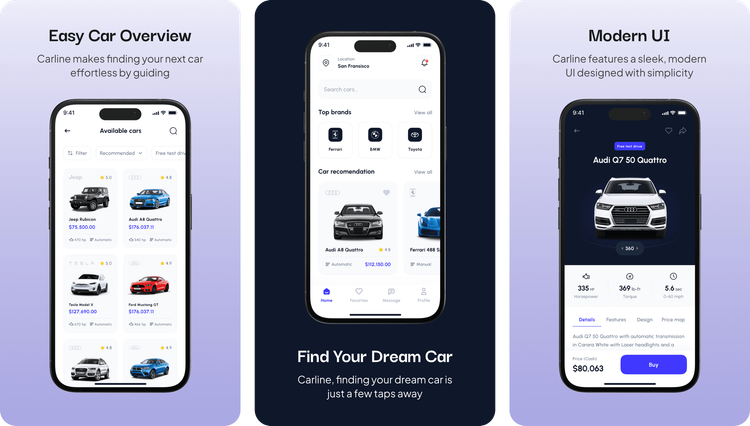
Onboarding asks users to pick their preferred car brands, and the home screen turns those choices into car recommendations with ratings, prices, and free test drive tags.

Mobile Appfor Carline
A mobile app project in automotive, delivered by DeveloperLook.
About the project
DeveloperLook designed and built Carline, a car marketplace app that asks for each user's favorite brands, recommends cars to match, and books test drives nearby. A dashboard manages cars, bookings, and transactions.
Carline is a mobile car marketplace app that balances personalization with clarity. Car shoppers often struggle to find the right car: too much information, little personalization, and an experience that changes from one platform to the next. Carline answers that with a clean interface, onboarding that learns what each user likes, and a recommendation system built on it.
During onboarding, users pick their preferred car brands, and the home screen uses those choices for its car recommendations. The home screen also shows the user's location, a search bar, top brands such as Ferrari, BMW, and Toyota, and quick filters by body type. Brand pages list models and available cars with horsepower, transmission, ratings, and prices, and the full list can be filtered and sorted.
Each car page opens with a 360-degree view and key figures for horsepower, torque, and 0 to 60 mph time. Tabs below cover details, features, design, and a price map. Users share cars, save favorites, chat in the app's messages, and buy a car, ending on a receipt they can download. A test drive scheduler lets them pick a date, a time slot, and a place on a map.
For the business side, a light-themed dashboard gives an overview of a car rental or automotive service: revenue, bookings, cars, customers, revenue statistics, and a booking schedule. Further pages manage cars, vehicle details and tracking, bookings, customers, transactions, and reports, across more than 35 pages.
Tell us what you are building. We reply within 24 hours with questions or a call time.
What do you need?
Challenge and solution
The challenge
They faced too much information, little personalization, and an experience that changed from one platform to the next.
Traditional browsing apps also lacked intuitive filters, recommendations, and engaging onboarding, which hurt retention and conversion.

Our solution
Onboarding captures those brands so the app can recommend cars that fit, while intuitive filters, a clean interface, and location-based suggestions do the rest.
Test drive booking, in-app purchase, and an operations dashboard complete the product.
What we built
Seven features, shown next to the screens they live on.
Onboarding asks users to pick their preferred car brands, and the home screen turns those choices into car recommendations with ratings, prices, and free test drive tags.
Users narrow results by sedan, hatchback, or convertible, filter and sort the full list of available cars, or search a brand's models by name.
Each car page shows a 360-degree view and key figures for horsepower, torque, and 0 to 60 mph time. Tabs cover details, features, design, and a price map.
Users pick a date and a time slot, then confirm where the test drive takes place on a map, from home or at a Carline hub.
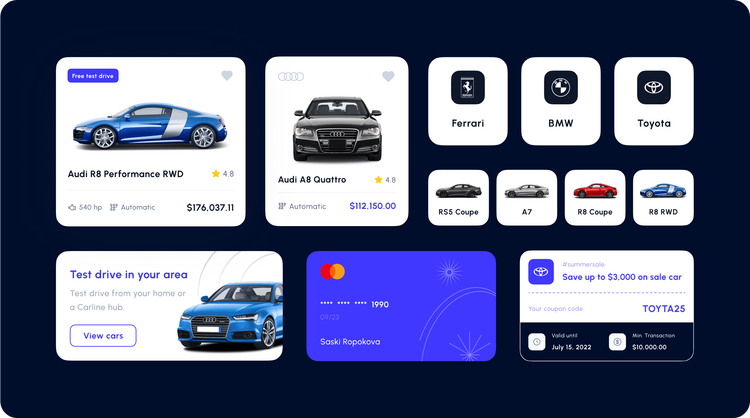
Buyers pay inside the app with a saved card and promo codes, then see a confirmed receipt with the car, date, address, and totals, ready to download.
A share sheet sends a car through messages, mail, or social apps. A favorites list keeps saved cars and prices together, and in-app messages handle the conversation.
A light-themed dashboard tracks revenue, bookings, cars, and customers, with a booking calendar and pages for car management, vehicle tracking, transactions, and reports.
FAQ
 Saimul IslamFounder & CEO, DeveloperLook
Still have questions?
Send a message or book a call with the team.
A car marketplace app and a management dashboard. The app covers brand-based onboarding, car recommendations, filters, 360-degree car pages, test drive scheduling, sharing, favorites, messages, and in-app purchase with a receipt. The dashboard runs a car rental or automotive service, with cars, bookings, customers, transactions, and reports across more than 35 pages.
It starts in onboarding, where users choose the car brands they prefer. The home screen then shows car recommendations built around those brands, next to top brands and body type filters. Location-based suggestions add cars and test drives close to where the user is.
Yes. On the test drive screen, users choose a date, pick a time slot, and confirm the location on a map before continuing. Cars tagged for a free test drive can be tried from home or at a Carline hub, so buyers drive the car before they commit.
Total revenue, bookings, cars, and customers at the top, with revenue statistics and a booking schedule calendar below. Side navigation leads to all cars, bookings, customers, transactions, and reports, and dedicated pages cover car management and vehicle details with tracking. The light theme keeps dense data readable.
People shopping for a car on their phone who want help narrowing the choice. Instead of scrolling every listing, they start from their favorite brands and filter by body type. Then they compare specs on each car page and book a test drive before they buy.
Yes. DeveloperLook designs and builds car marketplace apps with personalized onboarding, recommendations, filters, test drive booking, and in-app purchase. We add the dashboard your team needs for cars, bookings, and customers, designing around how your buyers narrow down a car.
Saimul IslamFounder & CEO, DeveloperLookStill have questions?
Send a message or book a call with the team.
Related services
This project
Carline Automotive App Design
Built with the 2 services around it
Free 30-min callGoogle Meet
Book a call
In 30 minutes on Google Meet we walk you through how we would build it, how long it takes and what it costs. Then you get a written estimate.
Calendar not showing? Book on cal.com or send a brief.