Mobile Appfor TrueLine

TrueLine Blog and News App With AI Summaries, Audio Articles, and Reader Quizzes

A mobile app project in news & media, delivered by DeveloperLook.

Industry
News & Media
Type
Mobile App
Status
Delivered

About the project

TrueLine Project Overview

DeveloperLook designed and built TrueLine, a blog and news app for readers who want credible stories without the noise. It pairs a clean article reader with listen mode, AI summaries, local news, and quizzes that feed reader leaderboards.

TrueLine is a blog and news app that brings readers authentic, relevant stories from around the world. The brief centered on credibility. In the app, people read trending articles, follow trusted sources, and explore curated categories in a calm, distraction-free space. The goal was to make staying informed feel easy and enjoyable.

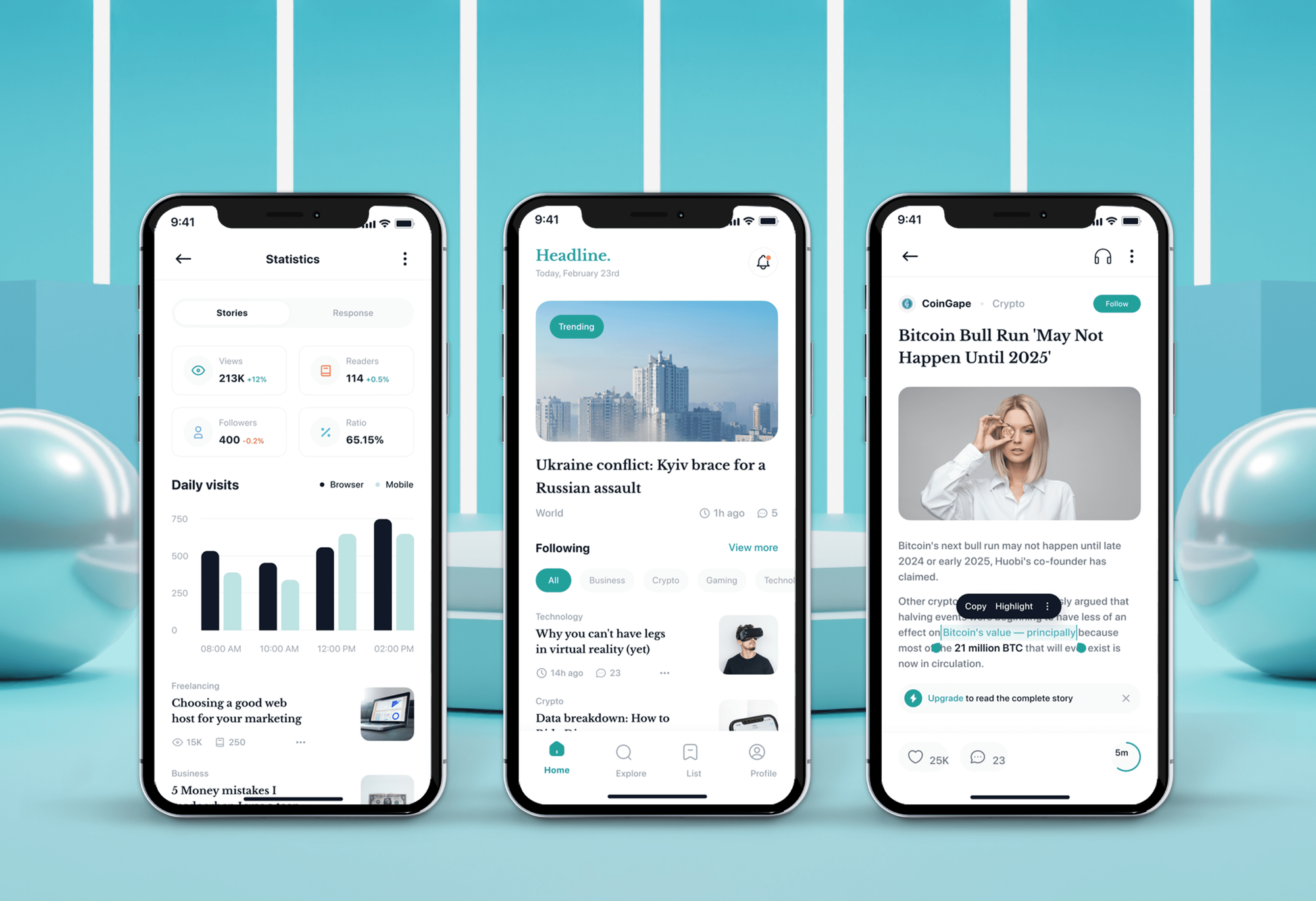
New readers start on welcome screens that offer to log in, register, or continue without an account. The home screen opens on a Latest feed with topic hashtags such as Economy, Sustainability, and Technology. Category chips cover World, Politics, Opinions, Health, Lifestyle, and more, and 4 tabs sit at the bottom: Home, My location, AI Summarizer, and Profile.

Articles are set in the Spectral serif typeface, with a reading progress bar, the author, the read time, and a related link. Readers can save a story, listen to it with a built-in audio player, or join the comments. After reading, a short timed quiz on the article earns points that count toward daily, weekly, and monthly leaderboards.

The My location tab maps the reader's area and lists news from nearby. The AI Summarizer turns a topic request into a short list of key developments. Subscription plans, a reading history, and settings complete the app, under a blue brand with a stacked line logo.

Client
TrueLine
Industry
News & Media
Type
Mobile App
Status
Delivered

Challenge and solution

What TrueLine Needed and How We Built It

The challenge

TrueLine needed a news app that felt trustworthy and modern at the same time.

Readers already face information overload, so the product had to stand out through clarity, credibility, and personalization. The interface also had to stay light while carrying text, images, embedded videos, and comment discussions.

Our solution

We designed a minimal, readable interface where strong typography, balanced spacing, and clear navigation keep the focus on the story.

Personalized recommendations, dark mode, and real-time article updates keep the feed current and relevant to each reader. Listen mode, AI summaries, local news, and article quizzes give people more ways to follow the news without adding clutter to the screen.

What we built

Features We Built for TrueLine

  • Distraction-free article reader

    Articles open with the category, the read time, the author, and a lead photo with its credit. A progress bar tracks how far the reader has scrolled, and a See also link points to a related story.

  • Listen mode for articles

    A listen sheet plays an article as audio with its headline, cover photo, a progress bar, and previous, pause, and next controls. The welcome screen presents it as a way to get the news without reading.

  • AI news summarizer

    From the AI Summarizer tab, a reader types the topic they want covered. The app returns a short summary with the key developments as bullet points, a disclaimer that points to full reporting, and a copy button.

  • Article quizzes with points

    A card under the article invites readers to answer a few questions about the story. The quiz runs against a timer with one multiple choice question at a time, and a congratulations screen shows the points earned.

  • Daily, weekly, and monthly leaderboards

    Quiz points feed a leaderboard with Daily, Weekly, and Monthly tabs. The top 3 readers stand on a podium with their profile photos, and everyone else follows in a ranked list with their scores.

  • News by location

    The My location tab scans the reader's position and shows it on a map. Below the map, a List News panel collects stories from that area, so local events sit next to the wider feed.

  • Comments and reader opinions

    Under each article, readers share their opinion in a reply box and see the latest comments with their likes. A More news section below the thread suggests the next story to read.

  • Subscription plans

    An Access all features banner leads to a subscription screen with monthly, 6 month, and yearly plans. Plan perks include live news updates, unlimited audio news, extra points, and expert analysis, with a free trial button.

Want a project like this one?

Tell us what you are building. We reply within 24 hours with questions or a call time.

What do you need?

FAQ

Questions About the TrueLine Project

  • A blog and news app for phones, along with its brand. The app covers onboarding, a Latest feed with topic hashtags and categories, the article reader, listen mode, comments, and quizzes with leaderboards. It also includes local news, an AI Summarizer, subscription plans, and settings. The brand uses a stacked line logo, the Spectral typeface, a blue palette, and social posts.

  • The reader opens the AI Summarizer tab and types the news topic they want covered. The app replies with a short overview and a bullet list of key developments. Each summary ends with a disclaimer that it is brief and that reputable sources hold the full picture, which fits TrueLine's focus on credibility.

  • After an article, a card offers points for answering a few questions about it. The quiz opens as a sheet with a countdown bar and one multiple choice question at a time. When the reader finishes, a congratulations screen shows the points earned and links to the leaderboards, which rank readers daily, weekly, and monthly.

  • Yes. The settings screen controls notifications for major and latest news, the text size, the display color scheme, and the app language. The app also supports dark mode. Readers who aren't ready to sign up can tap Continue without login on the welcome screen and start reading right away.

  • Yes. The My location tab scans the reader's position, shows it on a map, and lists news from that area underneath. Search covers everything else: a reader types a topic such as Sport and gets a list of matching articles, each with its category, read time, and save option.

  • Yes. DeveloperLook designs and builds news and blog apps with article readers, audio playback, comments, and subscriptions. We can add AI summaries, location-based news, or quizzes and leaderboards that reward your readers for engaging. We start with how your audience finds and trusts stories, then shape the feed, the reader, and the extras around that.

Saimul IslamFounder & CEO, DeveloperLook

Still have questions?

Send a message or book a call with the team.

Book a free call

Free 30-min call

Book a call

Book a free 30-minute call

In 30 minutes on Google Meet we walk you through how we would build it, how long it takes and what it costs. Then you get a written estimate.

Calendar not showing? Book on cal.com or send a brief.