
About the project
Bundlewise Project Overview
DeveloperLook designed and built Bundlewise, a multi‑tenant CRM where a form fill, a chat and a campaign reply all land on one lead record. Teams score leads from 0 to 100, move deals across a visual pipeline, let workflows send the follow-ups and connect AI agents over native MCP.
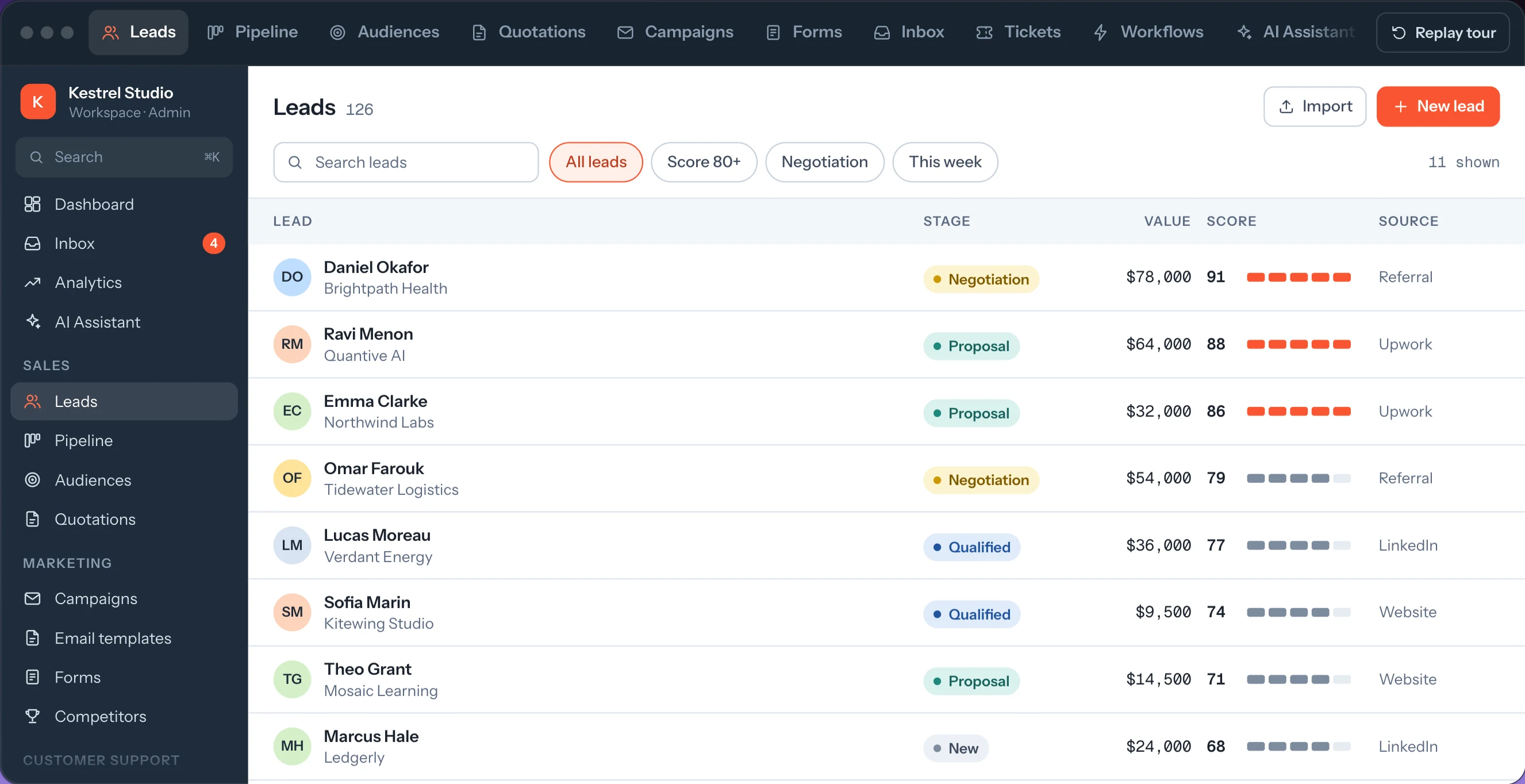
Seventeen modules share one workspace, from leads and scoring, the pipeline and quotations to campaigns, forms, a unified inbox with live chat, tickets, a knowledge base, no-code workflows and an AI assistant.
It is multi‑tenant from the data model up. A company holds any number of workspaces, every member has one role per workspace, and each role sets none, view, edit or full access on every module. The API reads that access again on every request, so a change applies at once.
Around the app we built the parts customers touch: an embeddable chat widget and forms for their websites, an MCP server with OAuth for AI clients, and bundlewise.app with 17 feature pages and 35 docs pages, all edited in a headless CMS.
- Client
- Bundlewise
- Industry
- Technology
- Type
- Web Application
- Stack
- React, TypeScript, Node.js, Express.js, MongoDB, Next.js
- 17modules in one workspace
From leads and the pipeline to the AI assistant, under one login.
- 10+channels in one inbox
Website chat, WhatsApp, Instagram, Telegram, LinkedIn and email.
- 200+MCP tools for AI agents
Leads, pipeline, campaigns, inbox and workflows, callable by name.
- 4access levels per module
None, view, edit or full, set per role in every workspace.
How it works
One lead, from the first click to a won deal
Every module writes to the same lead record, so nobody re-types a thing between tools. Follow one lead from a contact form to a signed quote.
Six seconds a step. Hover to hold, or click a step to jump.
Start a project
- Matches your ideal customer
- Opened all 3 emails
- Asked for a quote in chat
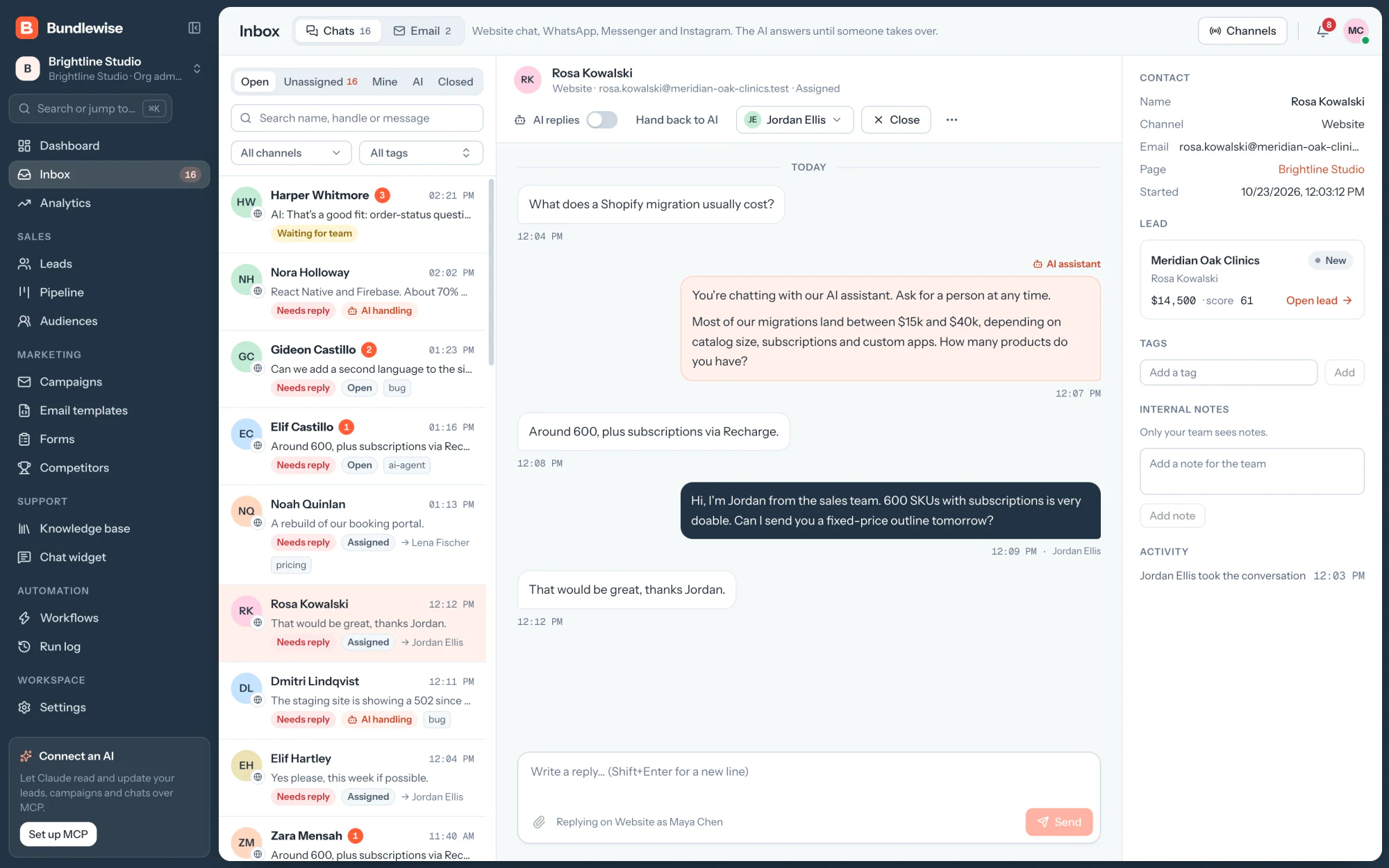
What does a Shopify migration usually cost?
AI assistantMost migrations land between $15k and $40k, depending on catalog size and apps. How many products do you have?
Around 600, plus subscriptions.
Jordan Ellis took the conversation
Jordan EllisHi, I'm Jordan from the sales team. 600 SKUs with subscriptions is very doable. Can I send you a fixed-price outline tomorrow?
What we built
The product, one module at a time
Real screens from the live app. The numbered pins on each screen match the notes beside its module.
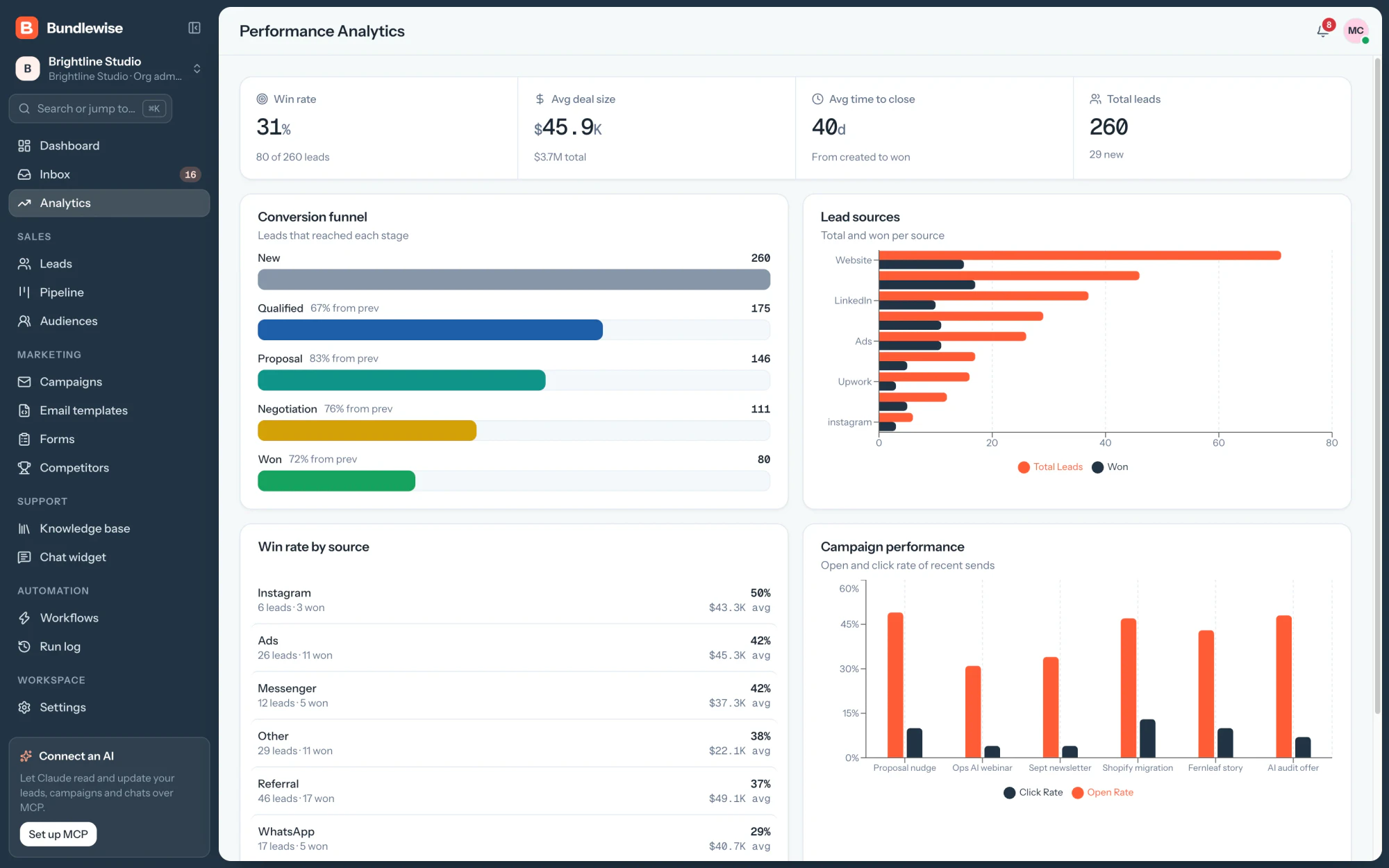
- Win rate, average deal and time to close
- A conversion funnel through every stage
- Lead sources against the deals they won
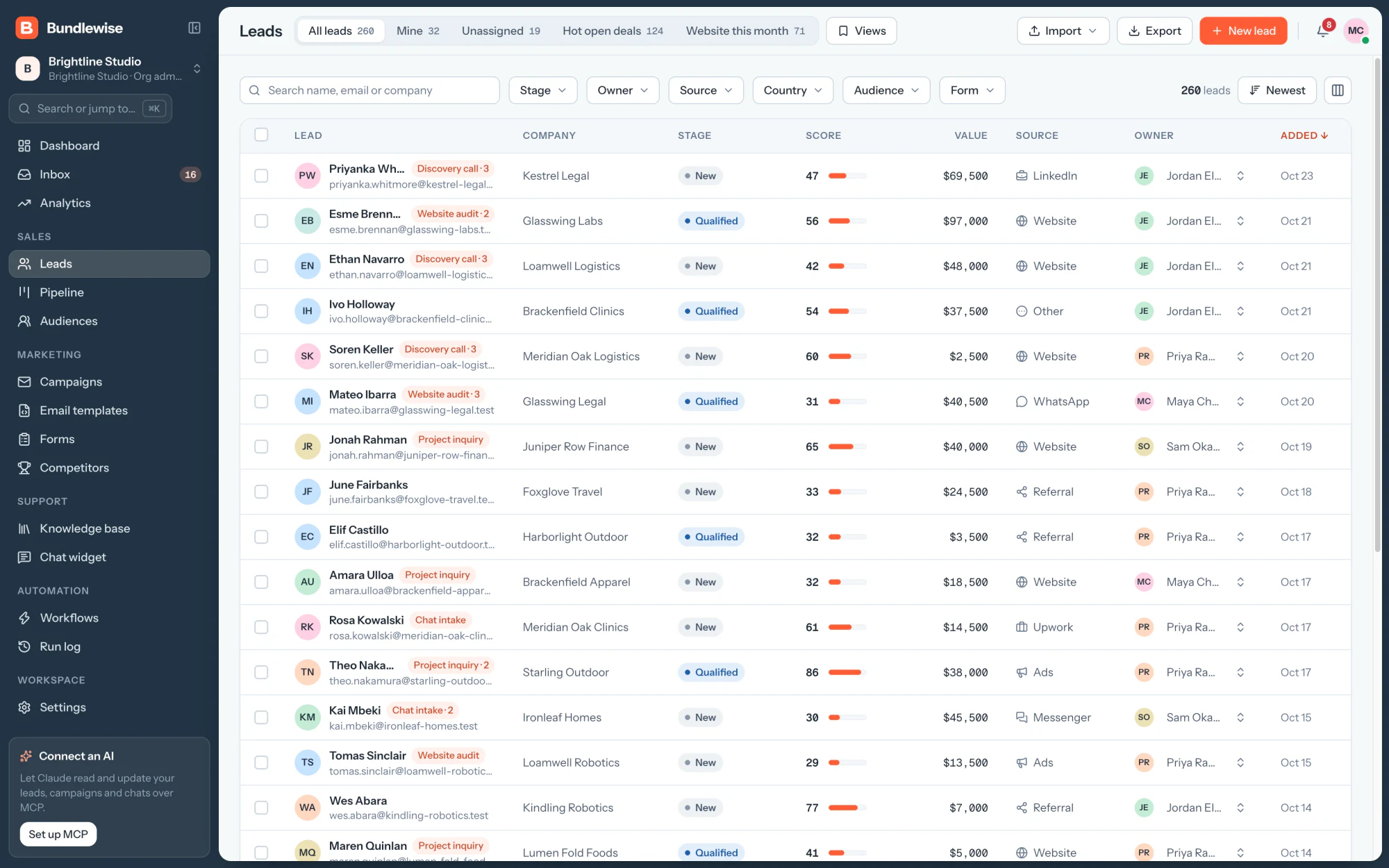
- A 0 to 100 score on every lead
- Where each lead came from
- Filters, saved views and custom columns
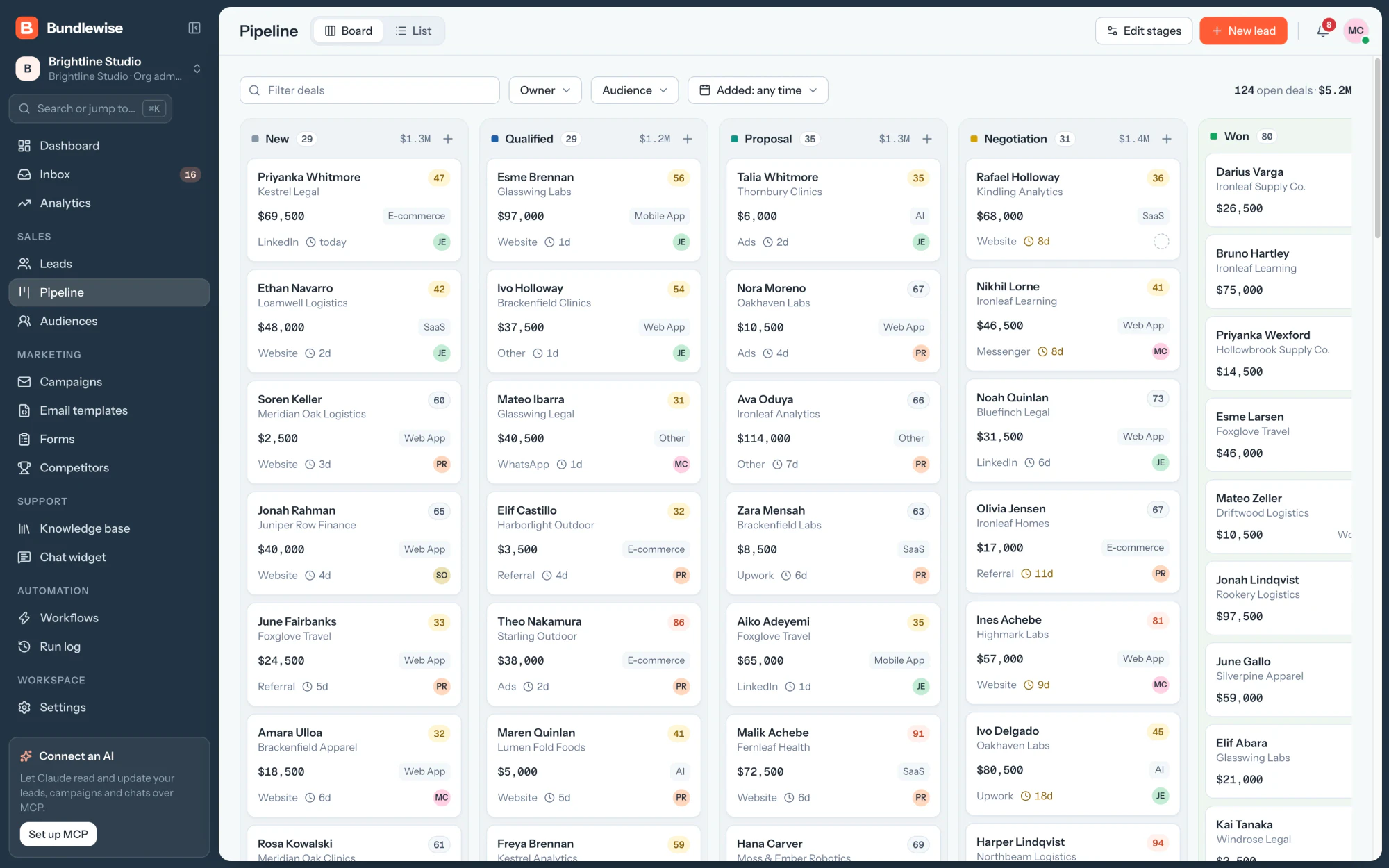
- Deal count and open value per stage
- Days since the deal last moved
- Filter by owner, audience or date
- The AI answers first, from the knowledge base
- Take over, or hand back to the AI
- The lead's record beside the chat
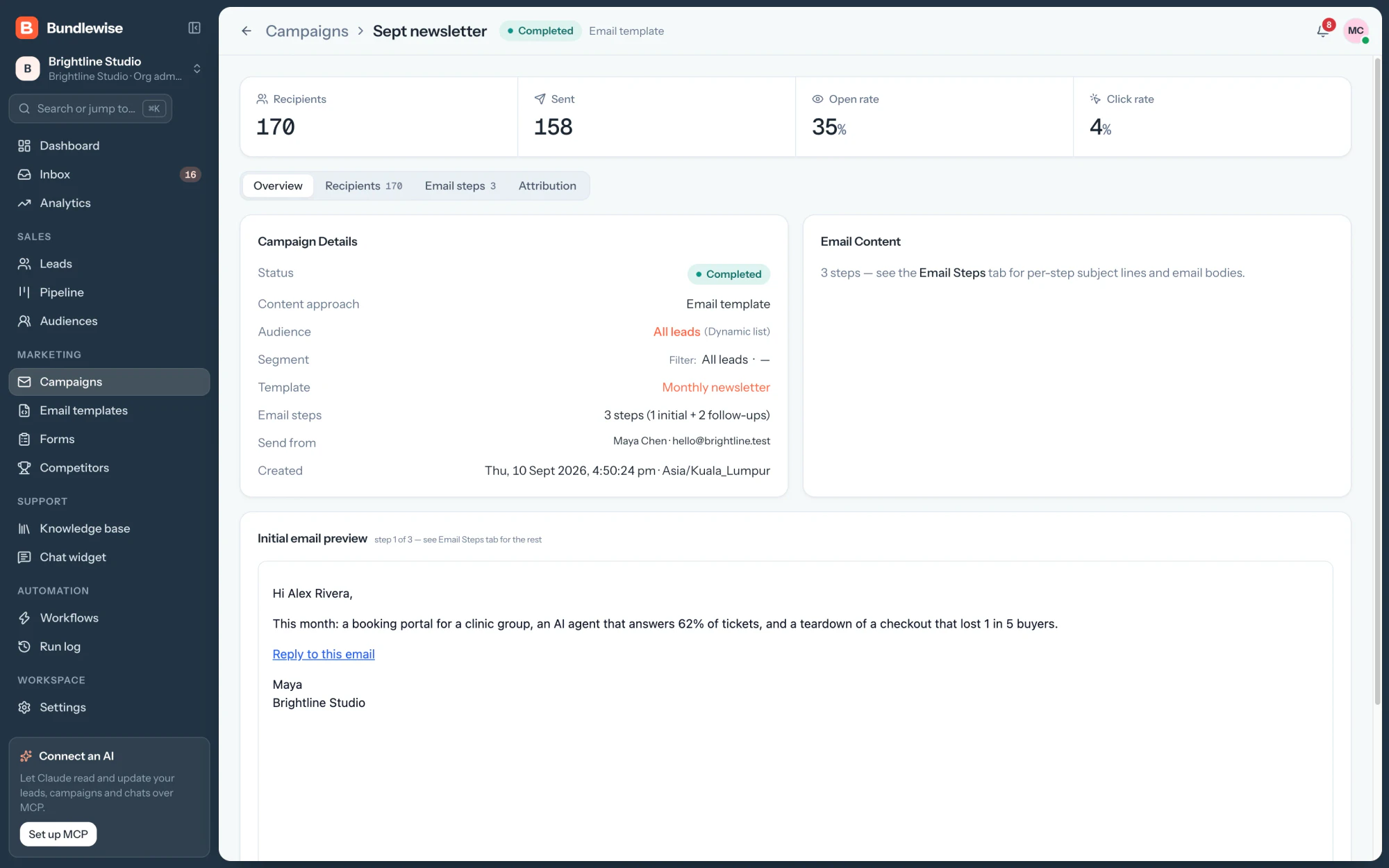
- Recipients, sends, opens and clicks
- One email and two timed follow-ups
- Sent from a connected Google, Microsoft or SMTP sender
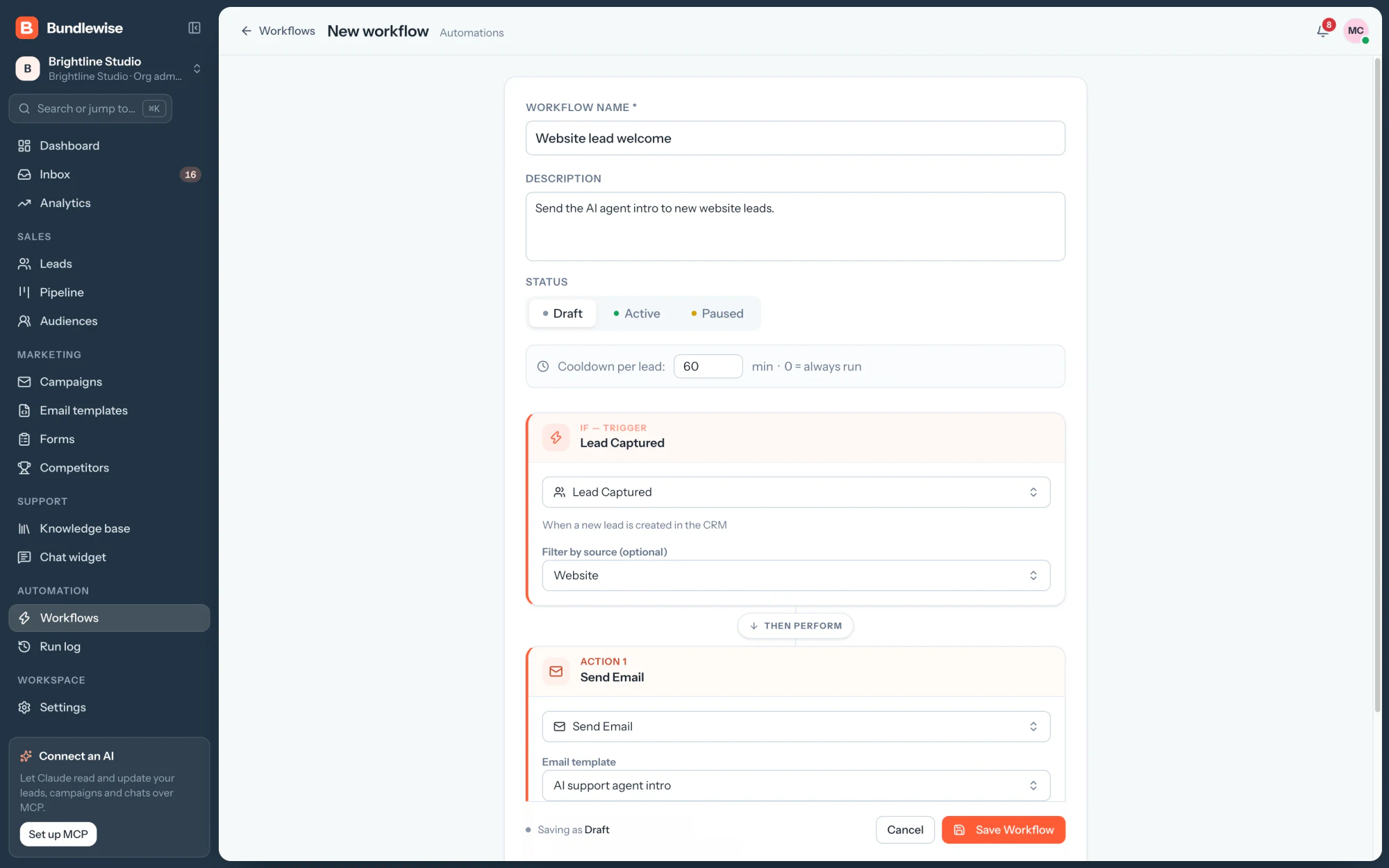
- IF: the trigger, with an optional source filter
- THEN: actions that run in order
- Draft, active or paused, with a cooldown per lead
Seven seconds a module. Hover to hold, or click one to jump.
 123
 123
 123
 123
 123
 123
Every screen
Sixteen more screens from the live app
From the lead record to the run log. Filter by area, or open any screen at full size.
Dashboard with the day's numbersSales
Lead record with the activity timelineSales
The chat widget on a customer's websiteSupport
Form builder with the field list and canvasMarketing
Unified mailboxSupport
A campaign step with AI-personalised emailsMarketing
Run log of every workflow actionAutomation
Competitor battlecardSales
Knowledge base the AI answers fromSupport
A multi-step public formMarketing
AI settings: provider, model and instructionsAI
Prospect search from ApolloSales
Members, one role per personWorkspace
Email senders: Google, Microsoft or SMTPMarketing
Branding per workspaceWorkspace
Adding a new workspaceWorkspace
Brand identity
One brand for the app and the website
Navy, signal orange and one mark, with Instrument Sans for words and Geist Mono for numbers. The same tokens run the CRM, bundlewise.app and every share card.


RegularMediumSemiboldBold
Turn every lead into revenue.
Stage tonesNew #8796A8Qualified #1F5FA8Proposal #0F9488Negotiation #D4A106Won #16A35FLost #D1343B
The website
bundlewise.app, the website that sells the product
We designed and built the marketing site too: 59 pages with the product's demos coded in, edited in our CMS and served as static HTML. Two pages at a time, side by side.


Content and SEO
Edited in a CMS, served as static pages, ready for search
Pages, docs, menus and each page's SEO live in Sitessa, the headless CMS we built. Every build pulls them in and ships plain HTML to the edge.
- 1EditSitessaSitessabundlewise
Docs › MCP Setup
SEO titleMCP Setup: connect Claude, ChatGPT or CursorDescriptionConnect Claude, ChatGPT, Cursor, Claude Code, Codex or Antigravity to Bundlewise over MCP…PublishPublished - 2BuildNext.js
pull-cmsPages, menus, docs and settings
seo.jsonTitles, the sitemap and redirects
next buildStatic export, one HTML file per page
Build ready
- 3ServeCloudflare
bundlewise.app/docs/mcp-setup
200OKtext/html
- Served from the edge, near each visitor
- The whole page is in the HTML
- 4FoundSearch
bundlewise.app › docs › mcp-setup
MCP Setup: connect Claude, ChatGPT or Cursor - Documentation | Bundlewise
Connect Claude, ChatGPT, Cursor, Claude Code, Codex or Antigravity to Bundlewise over MCP, with OAuth or a bearer token, and revoke access any time.
In the sitemapCanonical set
LiveThe change is on bundlewise.app, in the sitemap and ready for search.
- Static HTML
Every page is rendered at build time, so it loads fast and reads in full without JavaScript.
- SEO set in the CMS
Editors write each page's title, description and canonical, and decide whether it is indexed.
- Sitemap and redirects
Each build writes the sitemap, dated by every page's last publish, and the redirects set in the CMS.
- Structured data
The home page describes Bundlewise as a SoftwareApplication, with its organisation and website.
Want a project like this one?
Tell us what you are building. We reply within 24 hours with questions or a call time.
What do you need?
Challenge and solution
What Bundlewise Needed and How We Built It
The challenge
Leads came in through forms, chats and inboxes in separate tools, so deals slipped through the gaps.
Sales, marketing and support each worked in their own tool, and nobody saw the whole customer.
Agencies needed a private space for each client or team, with roles that decide who sees what.
Teams wanted their AI assistants to read and update the CRM without handing over the keys.

Our solution
We built one multi‑tenant CRM where every channel writes to the same lead record.
Forms, live chat, social inboxes and email land on one timeline, and every lead is scored from 0 to 100.
Companies, workspaces and roles keep each team's data apart, checked on every request.
A native MCP server lets Claude, ChatGPT and Cursor work with live data under the same roles.
Workspaces
A private workspace for every team, checked on every request
Companies hold workspaces and people hold one role in each. Every request is checked against both, and AI agents get the same answer as people.
Hover to hold, or click a step.
200Allowed: Sales has full access to Leads
403Blocked: Sales has no access to Settings
200Same workspace, same role, same answer
403Not a member of Kestrel Studio
- 01
Companies hold workspaces
An agency can run one workspace per client or region, each with its own leads, inbox, email senders and branding.
- 02
One role per person, per workspace
The same person can be an Admin in one workspace and Sales in another, and each role sets the access on every module.
- 03
Checked on every request
Access is read from the database on every call, never trusted from the sign-in token, so removing someone works at once.
Roles and permissions
Four ready-made roles, one level per module
Each role sets none, view, edit or full on all 18 modules. These are the presets every company starts with, and admins can change every role except Admin.
Leads
Access level: Full
- NoneNo access to this module
- ViewSee leads and their timeline
- EditAdd and change leads, notes and activities
- FullAlso delete, bulk edit, import and export leads
Works their assigned leads and the pipeline; reads marketing content.
A new cell every few seconds. Click any cell in the table.
| Module | Admin | Sales | Marketing | Support |
|---|---|---|---|---|
| Sales | ||||
| Leads | ||||
| Pipeline | ||||
| Audiences | ||||
| Quotations | ||||
| Marketing | ||||
| Campaigns | ||||
| Email templates | ||||
| Forms | ||||
| Competitors | ||||
| Support | ||||
| Inbox | ||||
| Tickets | ||||
| Knowledge base | ||||
| Chat widget | ||||
| Workspace | ||||
| Dashboard | ||||
| Analytics | ||||
| Automation | ||||
| AI assistant | ||||
| Workspace settings | ||||
| Members and roles | ||||
FullEditViewNoneTaken from the role presets in the Bundlewise code.
AI and MCP
Ask the CRM in plain language, from any AI client
We gave Bundlewise its own MCP server with 200+ tools. Agents sign in with OAuth and work with live leads, pipelines and campaigns under the user's role.
Which big deals in Negotiation have stalled for over a week?
Five deals have sat for more than a week. These three are worth $205,500 together, and Ivo Delgado has waited longest, 18 days. Shall I draft follow-ups?
Yes, draft them for me to check.
Three drafts are ready in Bundlewise. Nothing is sent until you confirm each one.
3 drafts waiting for your OKHover to hold, or click a step.
Connect an AI client
Connected in a minute, from the AI tool you already use
Settings › MCP access gives every workspace one server URL and the exact steps for each client. Sign-in happens in the browser.
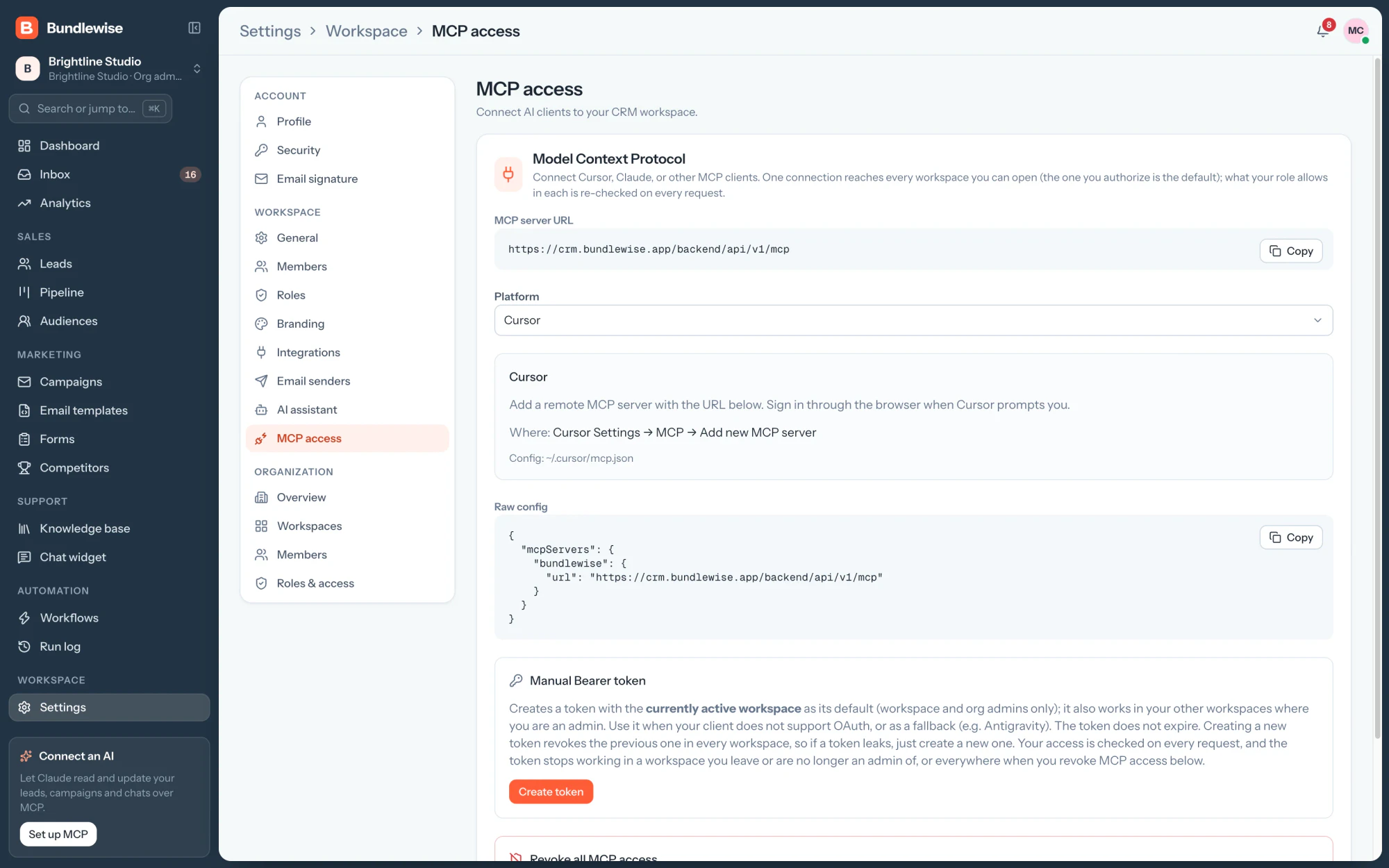
Hover to hold, or click a step.
One connection, every workspaceIt reaches each workspace you can open, with your role in each.
Limited and time-boxed120 requests a minute per connection, and sign-ins last 7 days.
Works with
- Claude Desktop
- ChatGPT
- Cursor
- Claude Code
- Codex
- Antigravity
FAQ
Questions About the Bundlewise Project
 Saimul IslamFounder & CEO, DeveloperLook
Still have questions?
Send a message or book a call with the team.
The whole product: a multi‑tenant CRM web app with 17 modules, an MCP server with OAuth for AI clients, an embeddable chat widget and forms, and the bundlewise.app marketing site with its feature pages and docs. We handled the product design, the build and the content model behind the site.
A company holds any number of workspaces, and every member has one role in each. Each role sets none, view, edit or full access on every module, and the API reads that access again on every request, never from the sign-in token. An agency can run one workspace per client or region, each with its own leads, inbox, email senders and branding, and removing someone works at once.
Through Bundlewise's own MCP server, which has 200+ tools. Settings › MCP access gives each workspace one server URL and the steps for Claude, ChatGPT, Cursor, Claude Code, Codex and Antigravity, and sign-in happens in the browser with OAuth. Clients without OAuth can use a workspace bearer token. Agents work under the user's role, and drafts come back as previews until a person confirms them.
The stack is React, TypeScript, Node.js, Express, MongoDB and Socket.IO, with a native MCP server for AI clients. The bundlewise.app website runs on Next.js, is edited in a headless CMS and is served as static pages from the edge, so every page loads fast and reads in full without JavaScript.
Yes. We designed and built the marketing site as well: 59 pages with the product's demos coded in, including 17 feature pages and 35 docs pages. Every page is edited in a headless CMS, and each build ships plain static HTML, so the whole site is ready for search and for AI assistants to read.
Yes. Tell us what your product needs to do, who uses it and which tools it must connect to, and we will suggest where to begin. We design and build multi-tenant SaaS products with workspaces, roles, AI features and the marketing site around them, as we did for Bundlewise.
Saimul IslamFounder & CEO, DeveloperLookStill have questions?
Send a message or book a call with the team.

Free 30-min callGoogle Meet
Book a call
Book a free 30-minute call
In 30 minutes on Google Meet we walk you through how we would build it, how long it takes and what it costs. Then you get a written estimate.
Calendar not showing? Book on cal.com or send a brief.