Fleet browsing and filters
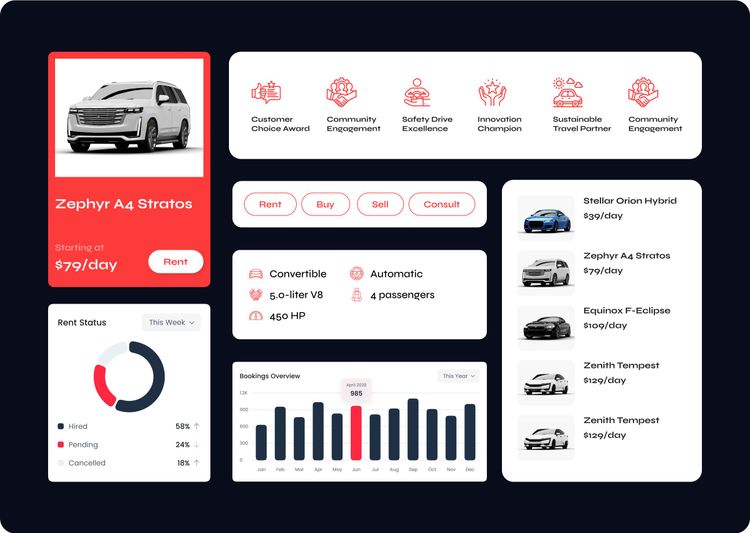
The fleet page lists every car with its daily rate and a Rent button. Search, sorting, car categories, and popular picks in a sidebar narrow the choice quickly.

Websitefor Carent
A website project in automotive, delivered by DeveloperLook.
About the project
DeveloperLook designed and built the Carent car rental website, where customers browse, filter, and book a car in a few steps. An internal dashboard runs vehicles, clients, scheduling, and transactions.
Carent is a car rental company offering flexible vehicle rentals for individuals and businesses. DeveloperLook designed and developed both its customer-facing website and an internal dashboard. The goal was a digital experience that reflects the brand's reliability, supports day-to-day operations, and keeps customers satisfied from booking to return.
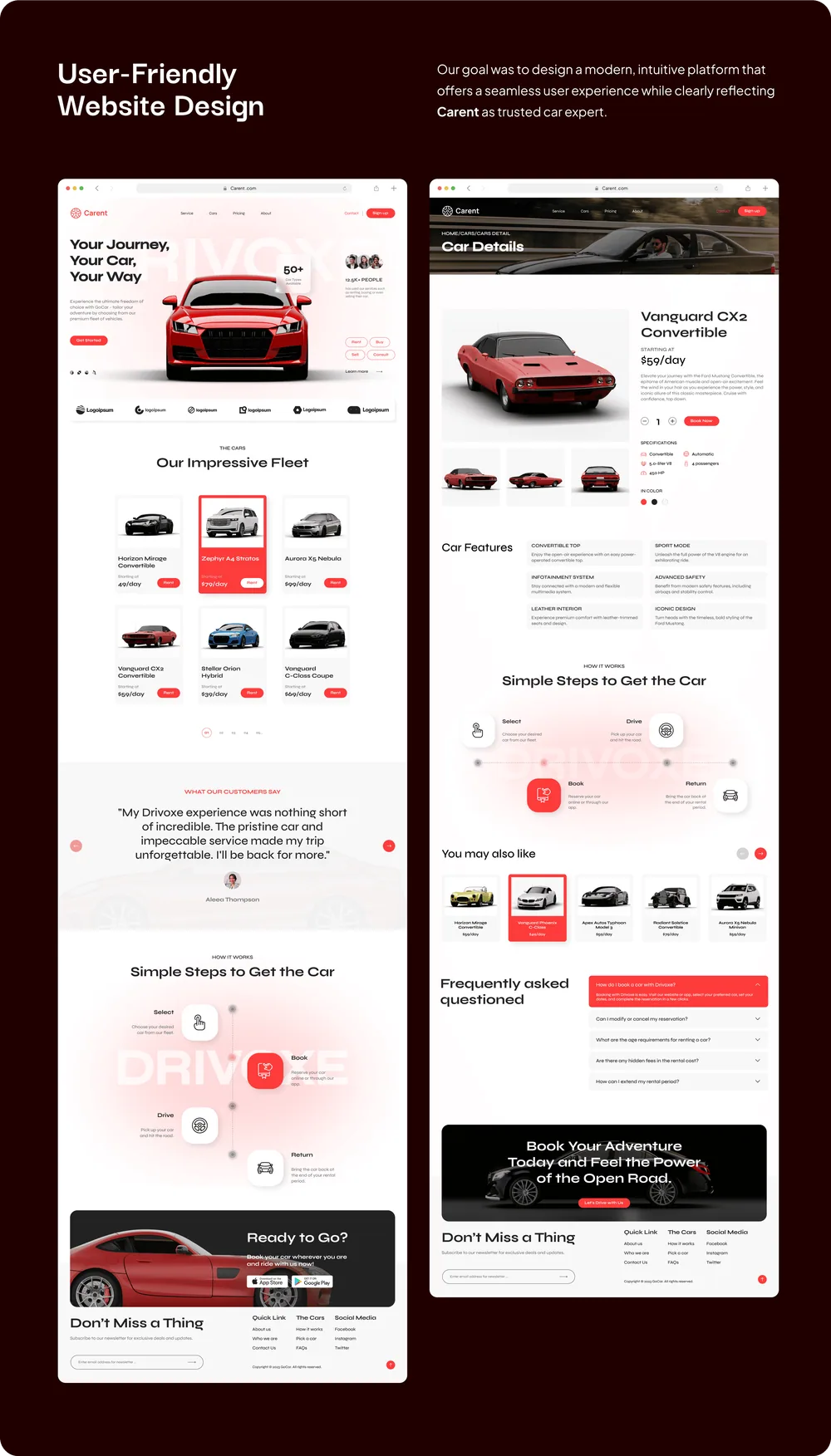
The website opens with the line "Your Journey, Your Car, Your Way" and a featured car. It then moves into the fleet, customer reviews, and four simple steps: select, book, drive, and return. The fleet page lists every car with its daily rate, plus search, sorting, categories, and popular cars in a sidebar. Each car page shows a gallery, the daily price, specifications, color options, car features, related cars, and FAQs, with a Rent Now button. The pages are responsive and built for mobile access, and mobile screens cover rental details, saved cards, notifications, and booking a nearby workshop or repair service.
The dashboard gives the Carent team revenue, new bookings, rented and available cars, earnings and bookings charts, rent status, and reminders on one screen. A car availability check filters by car type, date, and time. Further pages cover bookings, the vehicle inventory, a calendar for appointments, clients, drivers, financials, tracking on a map, and messages. The dashboard design runs to more than 35 pages.
Tell us what you are building. We reply within 24 hours with questions or a call time.
What do you need?
Challenge and solution
The challenge
Customers faced a clunky booking process, while the team worked with fragmented data, limited vehicle tracking, and poor task coordination.
The online presence also failed to show the trust and ease of use that renters expect.
Our solution
Behind it, a custom dashboard brings vehicle management, customer data, scheduling, and transaction tracking into one place.
It was designed to simplify fleet workflows and cut the errors that come from juggling separate tools.
What we built
Eight features, shown next to the screens they live on.
The fleet page lists every car with its daily rate and a Rent button. Search, sorting, car categories, and popular picks in a sidebar narrow the choice quickly.
Each car page shows a gallery, the daily price, and specifications such as body type, transmission, engine, and seats. Color choices, car features, FAQs, and a Rent Now button follow.
The home page explains renting in four steps (select, book, drive, and return), so first-time renters know what happens before they choose a car.
Mobile screens cover rental details, saved payment cards, notifications, and a profile, plus booking a nearby workshop or repair service from a map.
The dashboard home shows revenue, new bookings, rented and available cars, earnings and bookings charts, rent status, and reminders. An availability check filters by car type, date, and time.
A calendar lays out bookings and appointments by day and time, so the team sees which cars go out, which come back, and who is booked when.
A client management page lists renters and their details in one table, so customer data no longer sits across separate tools and booking systems.
A tracking page shows a rented car's route on a map beside the list of vehicles, giving the team the tracking their old tools lacked.
FAQ
 Saimul IslamFounder & CEO, DeveloperLook
Still have questions?
Send a message or book a call with the team.
A customer-facing car rental website and an internal dashboard for the Carent team. Customers browse the fleet, filter cars, and book in a few steps on any device. The team manages vehicles, bookings, clients, drivers, scheduling, tracking, and transactions from one dashboard that runs to more than 35 pages.
They pick a car from the fleet page, check its daily price, specifications, and features on the car page, and press Rent Now. The home page explains the process in four steps (select, book, drive, and return), so renters know what to expect before they start.
Revenue, new bookings, rented and available cars, earnings over time, and the share of hired, pending, and cancelled rentals. Staff check car availability by type, date, and time, and follow reminders such as fleet servicing. Other pages cover the vehicle inventory, calendar, clients, drivers, financials, and vehicle tracking.
Yes. The website is responsive and built for mobile access, so customers can browse, filter, and book a car from a phone. The gallery also shows mobile screens for rental details, saved cards, notifications, and booking a nearby workshop or repair service.
Individuals and businesses renting a car use the website. Carent's own team uses the dashboard to run the fleet: bookings, vehicle availability, appointments, clients, drivers, tracking, and payments. Both were designed together in the same red and white Carent brand, so the company looks the same to renters and staff.
Yes. DeveloperLook designs and builds car rental websites with fleet browsing, filters, car pages, and online booking, plus the dashboard your team needs for vehicles, bookings, clients, and payments. We start with how your customers choose and book a car, then shape the dashboard around how your team runs the fleet.
Saimul IslamFounder & CEO, DeveloperLookStill have questions?
Send a message or book a call with the team.
Related services
This project
Carent Automotive Website Design
Built with the 4 services around it
Free 30-min callGoogle Meet
Book a call
In 30 minutes on Google Meet we walk you through how we would build it, how long it takes and what it costs. Then you get a written estimate.
Calendar not showing? Book on cal.com or send a brief.