Total asset home screen
The home screen opens on the user's total asset value and growth percentage. A price chart runs from 1 week to All, with Buy, Sell, Receive, and Deposit buttons right below it.

Mobile Appfor CoinSphere
A mobile app project in crypto & NFT, delivered by DeveloperLook.
About the project
DeveloperLook designed and built CoinSphere, a crypto management app for investors and traders. Its home screen shows total asset value and trends with quick Buy, Sell, Receive, and Deposit actions, and a web dashboard adds trading tools.
CoinSphere is a cryptocurrency management app for investors and traders, from beginners to experienced users. It brings portfolio tracking, market insights, trading features, and learning resources into one clean, minimal interface. The aim was to make crypto easier to follow, with live data and clear tools on every screen.
The mobile app opens on the user's total asset value, a growth percentage, and a price chart. Buy, Sell, Receive, and Deposit buttons sit under the chart, and the portfolio splits holdings into crypto, cash, and NFTs. Users explore coins by category, keep a watchlist, set price alerts, and check a market sentiment gauge. Activity screens sum up each month's buys, sells, and withdrawals. Achievements add badges and a leaderboard.
Savings goals let users deposit toward a target, such as buying a house. A web dashboard brings the product to desktop. It covers wallet balances, QR code deposits, transaction history, and a BTC/USD trading screen with an order book. The design set runs to more than 20 pages, and the brand carries over to an app icon, social posts, and a billboard.
Tell us what you are building. We reply within 24 hours with questions or a call time.
What do you need?
Challenge and solution
The challenge
The sheer number of assets, technical jargon, and constant price swings made the space overwhelming, especially for newcomers.
Investors managed holdings across several wallets and struggled to keep up with price changes or judge which opportunities to trust.
The app also had to feel secure while staying simple to use.

Our solution
Buy, Sell, Receive, and Deposit sit one tap away on the home screen, and the portfolio breaks holdings down across crypto, cash, and NFTs.
A customizable watchlist keeps favorite coins in view.
Preview and confirm screens show the rate, fee, and amount before a sale or deposit goes through.
What we built
Eight features, shown next to the screens they live on.
The home screen opens on the user's total asset value and growth percentage. A price chart runs from 1 week to All, with Buy, Sell, Receive, and Deposit buttons right below it.
Explore Crypto lets users search coins, scan a price ticker, and browse popular coins by type. An editable watchlist keeps favorite coins in view with small trend charts.

Each coin has a detail screen with its price chart and time ranges. Users set a price alert at a level they choose, so they don't have to watch the chart all day.
Users search for a coin to buy, sell with a market order, or scan a card to add it. Deposits show a QR code and wallet address to copy, share, or email.
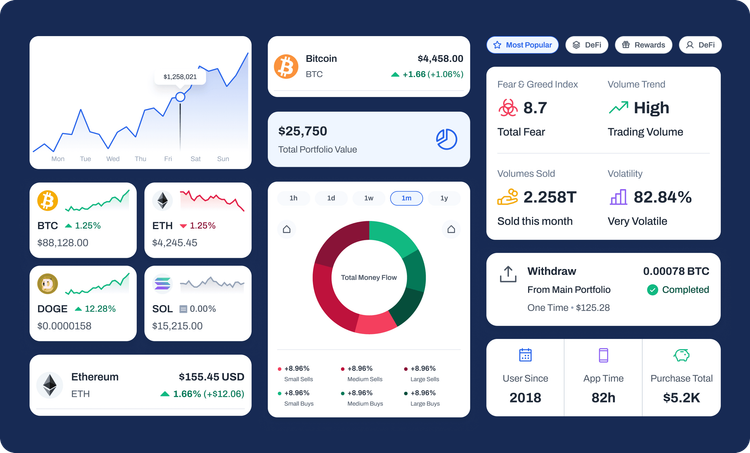
A Crypto Market Sentiment screen reads the market's mood on a gauge from 0 to 100. It explains the effects in plain words, and cards add a Fear and Greed Index and volatility.
Users set goals such as buying a house and deposit toward them from a chosen wallet on a set schedule. Goal screens track progress and let users add, move, or withdraw funds.
Activity Insight sums up each month's buys, sells, and withdrawals, with the most active day. Achievements add badges, a points leaderboard, and personal stats such as app time.
A desktop dashboard adds wallet balances, QR code deposits, and filtered transaction history. Its trading screen pairs a BTC/USD candlestick chart with a buy and sell form and an order book.
FAQ
 Saimul IslamFounder & CEO, DeveloperLook
Still have questions?
Send a message or book a call with the team.
A cryptocurrency management app for investors and traders, plus a web dashboard. The mobile app covers portfolio tracking, buying and selling, price alerts, market sentiment, savings goals, and achievements. The web dashboard adds wallet balances, deposits, transaction history, and a trading screen with an order book.
It opens on the user's total asset value, growth percentage, and a price chart. Buy, Sell, Receive, and Deposit buttons sit below the chart. Further down, My Crypto Portfolio splits total assets across crypto, cash, and NFTs, so users see their whole position on one screen.
Crypto investors and traders, from beginners to experienced users. Newcomers get plain-language screens, such as the market sentiment gauge, and short buy and sell flows. Experienced traders get the web dashboard, with a candlestick chart and an order book. Price alerts and the watchlist help both groups follow their coins.
Users name a goal, such as buying a house, and deposit toward it. The Deposit to Goal screen sets the asset type (crypto, cash, or NFT), the amount, the source wallet, and how often to deposit. Goal Details then shows progress and buttons to add, move, or withdraw funds.
Phones and desktop browsers. The mobile app holds the everyday screens: home, explore, watchlist, alerts, goals, and achievements. The web dashboard has a sidebar for the dashboard, wallet, orders, settings, and referrals. Its header adds a light and dark mode switch. Both share the CoinSphere logo and blue palette.
Yes. DeveloperLook designs and builds crypto apps with portfolio tracking, buy and sell flows, price alerts, and web trading dashboards. We start from how your users check balances and move funds. Then we design clear preview and confirm steps for every transaction. Licensing and custody rules depend on your market, so we plan those with your legal team first.
Saimul IslamFounder & CEO, DeveloperLookStill have questions?
Send a message or book a call with the team.
Related services
This project
CoinSphere Crypto App Design & Development
Built with the 4 services around it
Free 30-min callGoogle Meet
Book a call
In 30 minutes on Google Meet we walk you through how we would build it, how long it takes and what it costs. Then you get a written estimate.
Calendar not showing? Book on cal.com or send a brief.