Chat with Saimul

Mobile Appfor Upsen

Upsen Employee App and HR Dashboard for Attendance, Leave, and Events

A mobile app project in HR & staffing, delivered by DeveloperLook.

Project sheet

Industry
HR & Staffing
Type
Mobile App, Web Application
Features
Dashboard
Status
Delivered
Gallery
14 imagesView all

About the project

Upsen Project Overview

DeveloperLook designed and built Upsen, an HR app that greets each employee by name, lists upcoming events, and shows attendance records in daily, weekly, and monthly views.

Upsen is an HR app for the people who work inside a company and the administrators who look after them. Employees use it to stay informed, manage their schedules, and take part in workplace activities. HR staff use the same product to approve leave, follow attendance, and reach every team.

The mobile app opens with a personal greeting. The home screen lists upcoming events with their time and the staff invited, and a small chart shows attendance by day, week, or month. A second home layout puts the date, the user's position, and a clock in button at the top, with short work notes below. From there, employees check their attendance history, send leave requests with a supporting file, browse a staff directory, and plan tasks on a calendar.

Administrators work in a web dashboard of 40+ pages. A left-hand menu groups attendance, schedules, the employee directory, departments, day-off management, payroll, reports, and broadcast messages. The project also covered Upsen's brand: the logo, the app icon, office signage, a billboard, and social posts.

Client
Upsen
Industry
HR & Staffing
Type
Mobile App, Web Application
Status
Delivered

Challenge and solution

What Upsen Needed and How We Built It

The challenge

Upsen had to serve two groups at once: employees who open the app many times a day and administrators who manage the whole workforce.

Staff needed fast access to events, attendance data, and work notes. Putting all of that on a phone screen without burying people in detail was the core difficulty.

Our solution

We took a user-centered approach that put clarity and simplicity first on every screen.

Events, attendance, and notes each got a fixed place in an organized layout, so each screen asks less of the user's attention. The design is responsive, and a separate admin dashboard gives HR staff the full picture of attendance, leave, and departments.

What we built

Features We Built for Upsen

  • Personal home screen

    After login, the home screen greets each employee by name. It lists upcoming events with their date, time, and invited staff, above a chart of the user's own attendance.

  • One-tap clock in

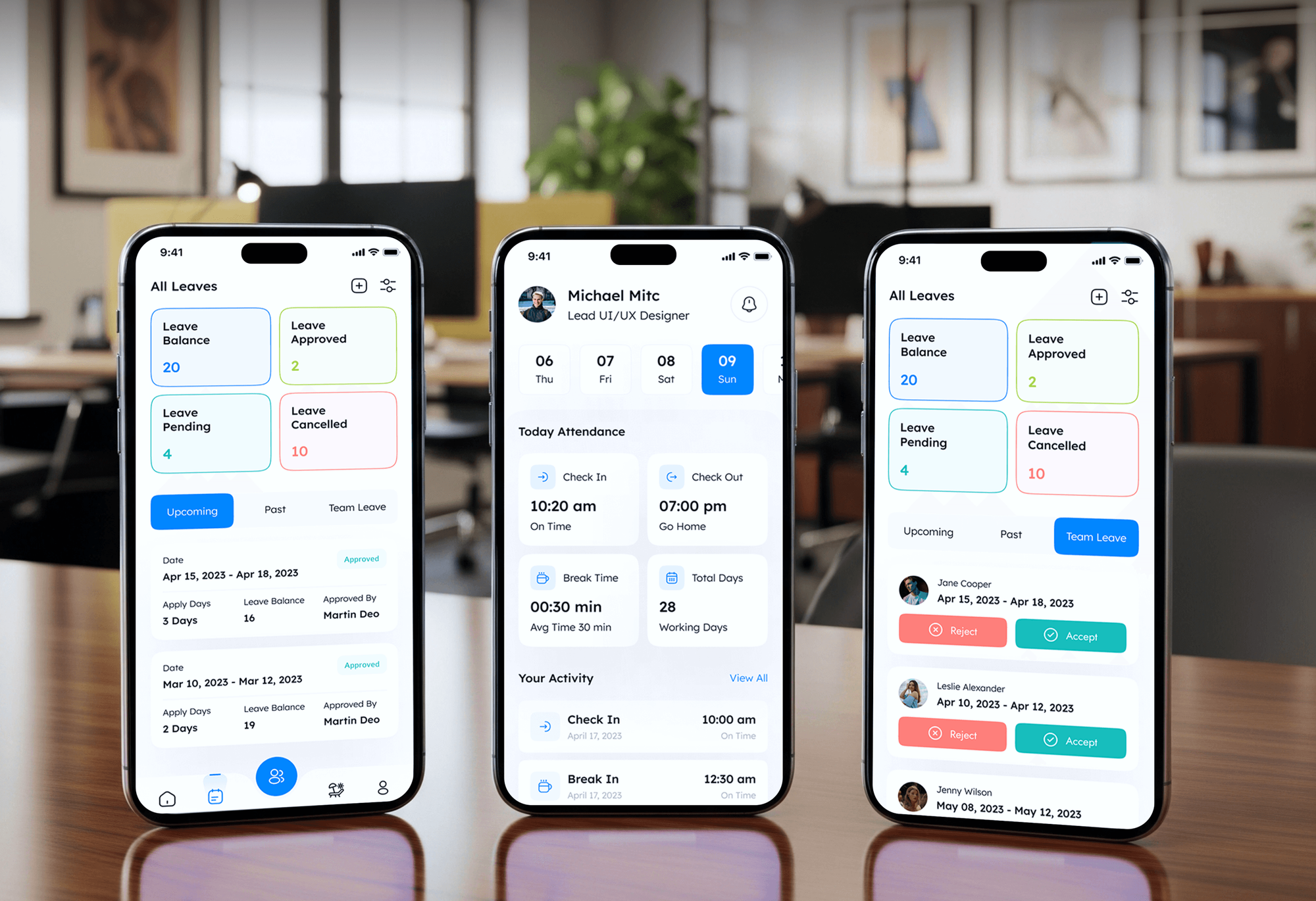
    A clock in button sits under the date and the user's position. The attendance list then records each day's clock in and clock out times and marks sick or casual leave.

  • Leave requests with documents

    Employees pick casual or sick leave, add a note, and attach a supporting document such as a doctor's certificate. A request list shows each one as waiting, approved, or cancelled.

  • Monthly attendance summary

    A daily attendance screen plots clock in times across the week. Below it, tiles count on time days, late arrivals, absences, leaves, early leaves, and rewards for the month.

  • Staff directory and profiles

    A directory filters colleagues by role and lets users call or message them from each card. Profiles hold contact details, the joining date, the division head, documents, and notes.

  • Tasks and team updates

    A task calendar lists work items with high or low priority labels. Each task opens to a description, the team members assigned to it, and a feed of today's updates.

  • Events, news, and broadcasts

    Employees see office events with dates and times, comment on company news, and search a help center. Administrators send broadcast messages to all staff or to a single department.

  • HR admin dashboard

    A web dashboard of 40+ pages tracks total employees, day-off requests, and average KPI. It also covers schedules, departments, payroll, and reports that HR staff can download.

Want a project like this one?

Tell us what you are building. We reply within 24 hours with questions or a call time.

What do you need?

FAQ

Questions About the Upsen Project

  • An HR mobile app for employees and a web dashboard for administrators. The app covers events, clock in, attendance history, leave requests, a staff directory, tasks, and company news. The dashboard runs to 40+ pages for attendance, schedules, departments, day-off management, payroll, reports, and broadcasts. We also designed the Upsen brand, from the logo and app icon to social posts.

  • From the home screen. The date and the employee's position sit above a single clock in button, so marking the start of the day takes one tap. Each entry then appears in the attendance list with clock in and clock out times, and days off show as sick or casual leave instead.

  • Employees fill in a short form with their name, position, and employee ID, choose casual or sick leave, and add a note. They can attach a file such as a medical certificate. Requests then move through waiting, approved, or cancelled, and administrators review them on the day-off management page of the dashboard.

  • Two groups in the same company. Employees use the mobile app to check events, record attendance, request leave, and follow tasks. HR staff and managers use the web dashboard to see attendance by department, approve time off, and run payroll. They also generate reports and send announcements to everyone or to one department.

  • Yes. We design and build HR apps with clock in, attendance tracking, leave requests, staff directories, and task lists for employees, plus an admin dashboard for approvals and reports. We start with what your staff check most often and give it a fixed, clear place on the screen.

Saimul IslamFounder & CEO, DeveloperLook

Still have questions?

Send a message or book a call with the team.

Get in touch

30-min strategy call

Book a call

Book Your Exclusive Strategy Session Today!

Pick a 30-minute slot that works for you. We meet on Google Meet to align on goals, scope, and the right next step.