
Role and metric map
Each user role, the decisions they make, and the metric behind each decision, ranked before design starts.

For SaaS teams and product owners whose dashboards confuse users: screens designed around the decisions each role makes, using your real data, from $900.
5sec
To spot the key number
100%
Screens designed with real data
Teams we have built for:














The Problem
Dashboards usually grow one request at a time. Each new chart made sense alone, and together they bury the numbers people log in to see.
01 · Clutter
The home screen holds 14 cards in three chart styles.
Each role's key number sits top left, and the rest moves to drill-downs.
02 · Chart choice
A pie chart compares 12 slices nobody can tell apart.
Every chart is picked for the question it answers, often a sorted bar.
03 · Empty states
New accounts see a blank grid with no next step.
Empty, loading, and error states get designed with a clear next action.
04 · Support load
Customers email screenshots asking what a number means.
Labels, units, and tooltips explain each metric right where it's shown.
Your dashboard started with four clear numbers. Then sales asked for a pipeline chart, support wanted ticket trends, and a big customer needed an export button on every widget. Now the home screen holds 14 cards in three chart styles. New users scroll past the metric that matters. A pie chart compares 12 slices nobody can tell apart. Empty accounts see a blank grid with no hint of what to do next. Customers email screenshots asking what a number means, and your team answers the same question every week.
We start by listing the decisions each user role makes and the one number behind each decision. That number goes top left, at full size. Every other metric earns its place or moves to a drill-down. We pick each chart for the question it answers, design empty and error states, and test the layout with your real data. Users read the screen in seconds instead of studying it.
Decisions shape the layout
Each role's key decisions set what sits at the top and what moves to a drill-down.
The right chart per question
Trends get lines, comparisons get bars, and single numbers get big type instead of a gauge.
Real data, real edge cases
Long names, zero values, and huge numbers get tested in the design, not discovered after launch.
Our Dashboard Design Process
You approve the metric list for each role, then the layout, then every state of every chart before developers see a single file.
We look at your current dashboard, your data sources, and the questions customers ask support most often. You get a first view of what to keep, what to cut, and a fixed price.
What's Included
Each project covers the metrics, layouts, charts, and states your developers need, designed around the decisions your users make every day.
Compare Options
An in-house developer is quick when the data is ready, and a BI template is cheap for internal reports. Here's where each fits best.
| Feature | DeveloperLookBest fit | In-house developer | BI template |
|---|---|---|---|
| Starting point | Decisions each role makes | Database tables available | The tool's default layouts |
| Chart choice | Picked per question asked | Whatever the library offers | Built-in chart types |
| Data in design | Real samples, edge cases included | Real data, little design | Your data, fixed visuals |
| Empty and error states | Designed for every widget | Often left blank | Tool defaults |
| Speed to first view | 1 to 2 weeks | Fast if data is ready | Hours for simple reports |
| Look and brand | Matches your product and brand | Matches your codebase | Limited theming |
| Cost | Fixed price from $900 | Salary already paid | License fee per user |
| Best for | Customer-facing product dashboards | Quick internal tools | Internal BI reporting |
Projects We've Built
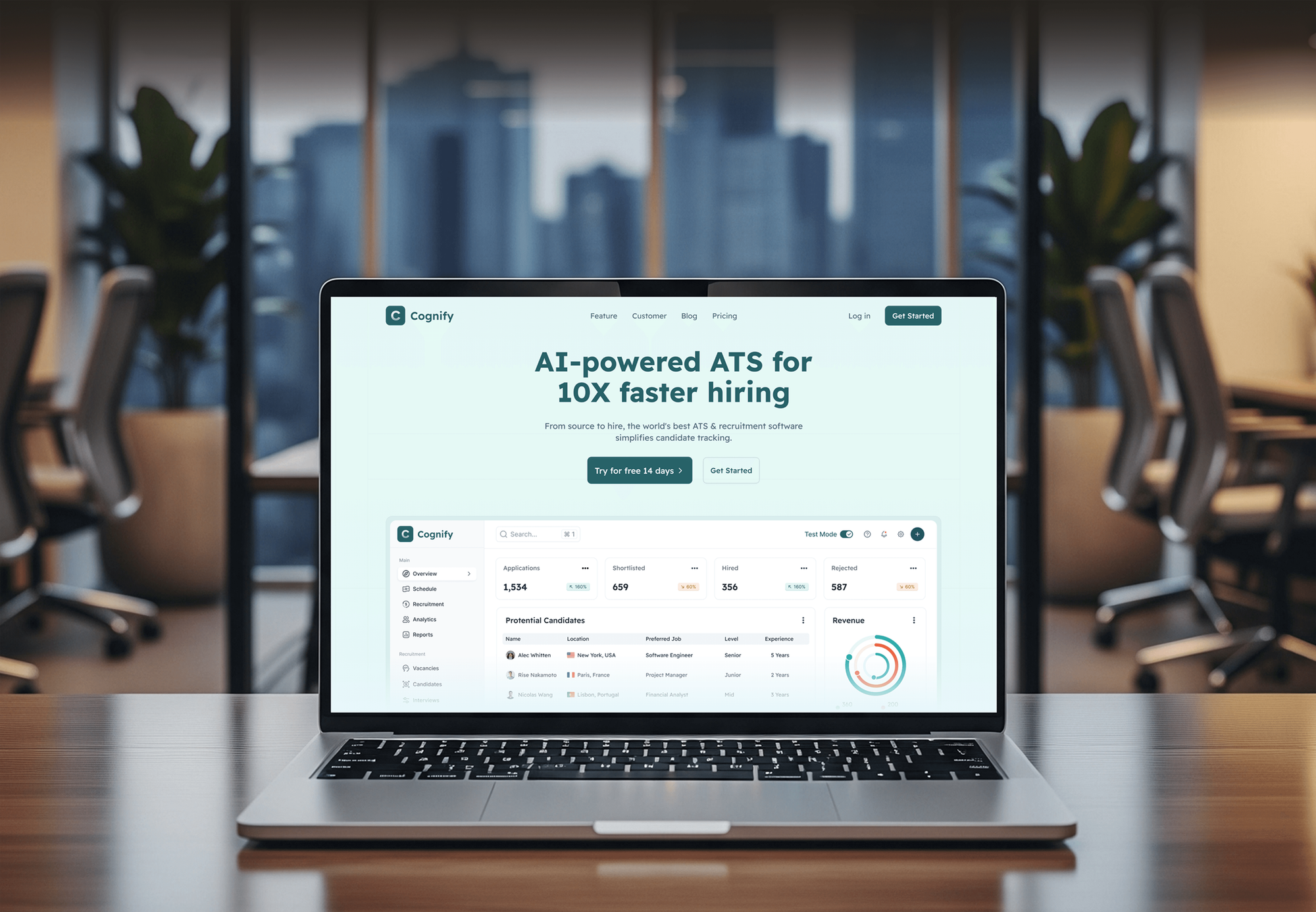
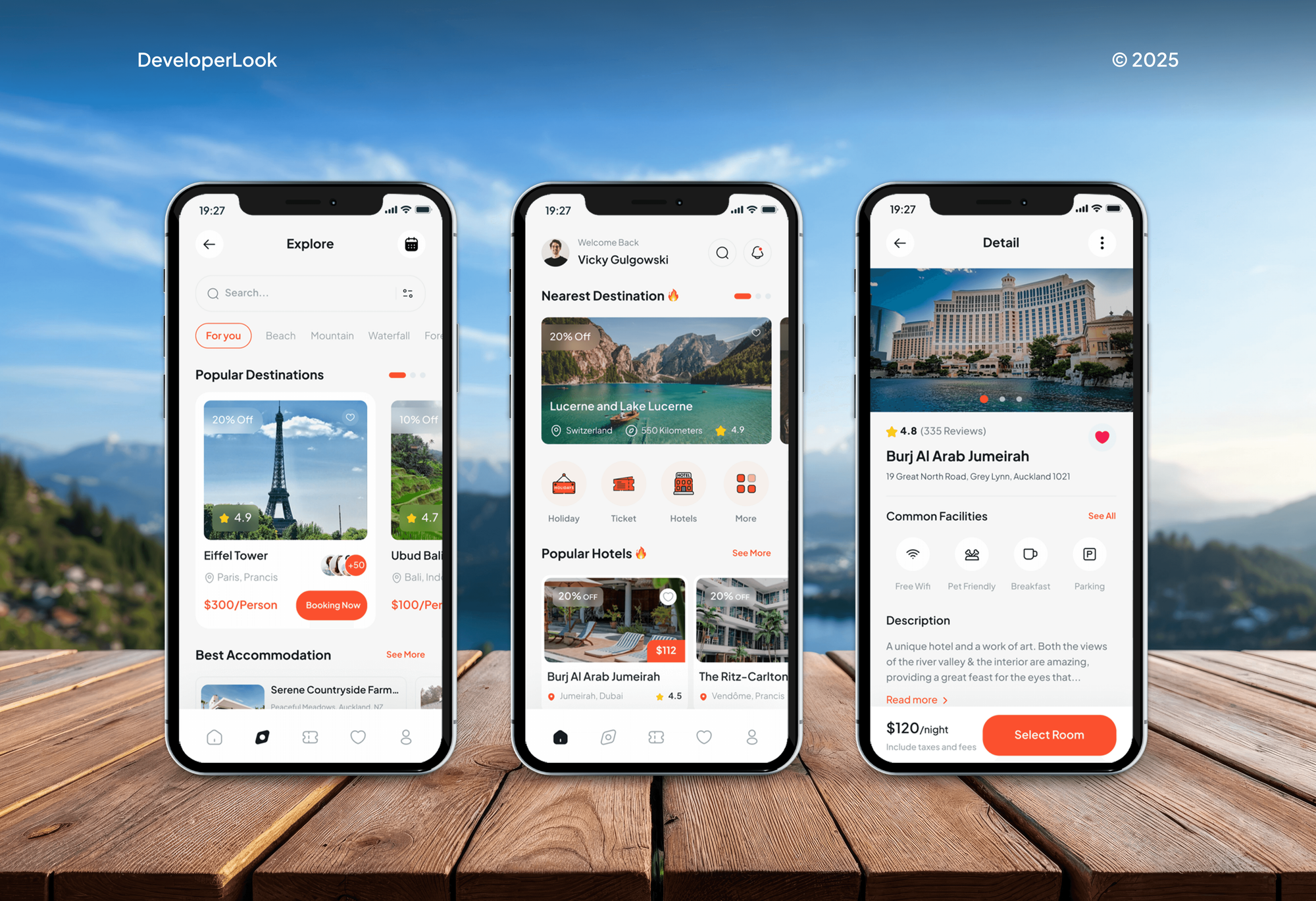
Dashboards and admin panels our team designed and built for HR, trading, risk management, travel, food delivery, and retail clients.


What Our Clients Say
Feedback from teams we have designed and built web apps and websites for.
We had a pretty specific idea of what we wanted our website to become, but I wasn’t sure how easily we could explain all of it to a development team. There were quite a few moving parts, and we were working toward a deadline, so I expected a few things to get lost along the way. That never really happened. They understood what we were trying to achieve, kept us updated throughout the process, and got everything ready within the agreed timeline. The final site feels much easier to navigate, works beautifully on mobile, and is noticeably smoother for our customers. It was a huge relief seeing the original idea actually turn into the website we had in mind.
The mobile experience is probably my favourite part of the new site. We had spent a lot of time making sure the desktop version looked right, and the team kept pushing us to think about how everything would actually feel on a phone too. They were right. The navigation is clean, the interactions feel natural, and everything we’ve tested so far works exactly as it should. They also went through the links, forms, integrations, and other details more than once before launch, which I really appreciated. And even after going live, we could still reach out when something came up. The whole process felt friendly, organised, and surprisingly straightforward.
What I appreciate most is that the website is actually easy for us to manage now. We can update content ourselves instead of sending a developer a message every time we need to change something small. They also paid attention to the technical SEO side, which mattered to us because we didn’t want a new website to create problems for the traffic we already had. I’ve probably asked more questions than I should have since launch, but every question has been handled patiently and without any fuss. The team is easy to work with, they explain things clearly, and when we need something changed, they focus on getting it done rather than making the process complicated.
1,250+
Projects shipped
10+
Years of experience
Top 3%
Upwork Top Rated Plus
5 stars
Average review score

Want results like these?
Tell us what you are building. You get a reply within 24 hours on business days, then a written estimate.
Work Culture
Good dashboard design services start with your data, not a mood board. These habits keep every screen readable, honest about the numbers, and buildable.
We design with exported samples of your real data, including the messy rows. Layouts that survive real numbers don't break after launch.
Every widget has to answer a question someone actually asks. If a chart doesn't change a decision, we suggest removing it.
We check color contrast and pair every status color with a label or icon. Color-blind users read the same story as everyone else.
A front-end developer reviews layouts before handoff for chart library limits and data load. You won't approve a widget your stack can't render.
If a ready-made admin template covers your internal tool, we'll tell you before we quote. Custom design pays off most on customer-facing dashboards.
Figma files, chart specs, and the component kit move into your accounts at handoff. Any developer can build from them without us.
Overview
DeveloperLook offers dashboard design for SaaS products, customer portals, and internal web apps. We map the decisions each user role makes, pick the right chart for every question, and design every state in Figma with your real data. Projects start at $900, take 1 to 10 weeks, and include developer-ready files.
DEVELOPERLOOK
Project facts · Dashboard Design Services
Reviewed 7 Oct 2026 by Saimul Islam
Good fit
SaaS teams with a crowded home screen
Your customers log in to a dashboard full of charts, and support tickets show they can't find the one number they came for.
Founders hiring for data design
You want to hire dashboard designers who understand data, not just colors, before your developers build the reporting area of your app.
Ops teams with internal tools
Your operations team runs on an internal tool built by developers, and every new metric makes the dashboard interface design harder to read.
Product managers adding analytics
You're adding analytics to your product and want a modern dashboard design your customers understand without a training video.
Agencies with data-heavy clients
Your agency needs a dashboard designer who can turn a client's reporting requirements into clear Figma screens under your brand.
Not a fit
Power BI or Tableau reports
You want reports built inside Power BI or Tableau for internal teams. A BI consultant who works inside those tools is a better fit than custom design.
Store reporting dashboard
You run an online store and need a working sales and inventory dashboard. Our Ecommerce Dashboard Development page builds those from your store data.
Whole product needs design
Your whole app needs designing, not just its dashboards. Our UI/UX Design Services page covers every flow, from onboarding to settings.
Budget under $900
Your budget is under $900 and you need one internal view. A ready-made admin template with your logo will serve you better for now.
Not sure we're the right fit?
Book a free call or message us. We'll tell you honestly whether we're the right team.
Pricing
These are starting points in USD. Your final price depends on user roles, screen count, and the states each chart needs, and you get a fixed proposal after a free data review.
For teams that need one dashboard for one user role redesigned in 1 to 2 weeks.
$900one-time, USD
For SaaS products with several user roles, filters, and drill-down views to plan and design.
$2,400one-time, USD
For platforms with a full reporting area, admin views, and screens for every device size.
$4,600one-time, USD
For Agencies
You own the client relationship. We supply the metric mapping, Figma dashboards, and chart specs under your brand, so your developers build reporting screens your client understands. Quotes are fixed, and every file lives in your Figma team.
White label: your client only ever sees your brand
Send the client's user roles, sample data exports, and the reports they use today.
You get a metric map, a screen list, and a fixed price within 3 days.
Branded Figma dashboards and chart specs, ready for your developers or ours.
Workshops and Figma files presented under your agency's name.
Designers who read data exports and chart specs, not just mockups.
Quotes you can resell without hourly surprises halfway through.
Extra dashboard designers when several client launches land at once.
The Right Technology for Your Project
We design in Figma, spec charts for the libraries your developers already use, and plan around your real data sources and APIs.
 Figma
Figma Sketch
 Adobe XD
 React
React Next.js
 Tailwind CSS
 Firebase
 GraphQL
 Node.js
FAQ
Straight answers on costs, timelines, chart choices, and building the dashboard after design.
Saimul IslamFounder & CEO, DeveloperLookStill have questions?
Send a message or book a call with the team.
Our dashboard projects start at $900 for one dashboard view and up to 5 related screens for a single user role. Product dashboards with 3 roles and up to 15 screens start at $2,400, and full analytics suites with a component kit start at $4,600. You get a fixed price after a free data review.
One dashboard takes 1 to 2 weeks to design, and a full product with several roles takes 3 to 10 weeks. The metric workshop usually happens in the first week. Getting real data samples early saves the most time, because layouts get tested against actual numbers from day one.
A good dashboard shows the one number each user needs first, in plain words, with context like a target or last period. The dashboard design best practices we follow are simple: one question per chart, consistent units, few colors, and designed empty states. Everything else moves to a drill-down.
The fundamental challenge is choosing what to leave out. Every team has metrics it wants on the main screen, and adding them all makes the important ones invisible. We solve it by ranking metrics against the decisions each role makes, then moving everything else into filters and detail views.
It's worth it when customers or staff use the dashboard daily, and less so for a report three people open monthly. For a SaaS product, the dashboard is often the first screen customers see after logging in. For internal tools, a ready-made template is usually enough, and we'll say so.
Agencies design custom reporting dashboards by starting with the client's decisions, then mapping each one to a data source and a chart. Next come wireframes with real data, visual design, and specs for developers. We follow the same steps, and agencies often hire us to deliver them under their own brand.
Layout decides which numbers people notice, so it shapes which decisions they make and how fast. A clear screen puts the metric tied to each decision first, with a comparison that shows whether it's good or bad. Poor layouts bury that number, and people decide from habit instead of data.
No, dashboards look simple but are hard to design well, because real data breaks neat mockups. Long customer names, zero values, and sudden spikes all need a plan. Most of the work goes into ranking metrics, choosing charts, and designing the states users hit when data is missing or slow.
Yes, our developers can build the approved designs in React or Next.js with Chart.js or D3.js, connected to your API. You can also hand the Figma files to your own team, since every chart has a written spec. Builds are quoted separately once the design is approved.
Yes, all Figma files, chart specs, and components move into your accounts at handoff, with no license fees. Each plan includes 2 to 4 weeks of support after handoff. On the largest plan, we stay on call through the build, so developers can ask about any card or state.
Saimul IslamFounder & CEO, DeveloperLookStill have questions?
Send a message or book a call with the team.
Free 30-min callGoogle Meet
Book a call
In 30 minutes on Google Meet we walk you through how we would build it, how long it takes and what it costs. Then you get a written estimate.
Calendar not showing? Book on cal.com or send a brief.