
License and data review
A written note on SharePoint versus Dataverse and which users, if any, need premium licenses.

For Microsoft 365 teams buried in paper forms, spreadsheets, and email approvals: apps your staff open on their phone or in Teams, from $1,150.
3X
Faster request approvals
24/7
Forms on phone and Teams
How your project runs
Teams we have built for:














The Problem
It shows up when requests grow past what forms and inbox rules can track. Approvals slow down, data lands in several places, and nobody owns the spreadsheet.
01 · Paper forms
Checklists are photographed, emailed, then retyped by the office.
Staff submit checklists and photos in the app, straight into SharePoint or Dataverse.
02 · Stuck approvals
Requests sit in a manager's inbox while they travel.
Approval flows ping managers in Teams and show every request's status.
03 · Missing records
The old app shows only part of a large list.
We write delegable queries, so searches and filters cover every record.
04 · Orphaned app
The colleague who built it left, and nobody can edit it.
Apps ship as solutions with notes, so your admin can maintain them.
Your field staff fill in a paper checklist, photograph it, and email it to the office. Someone retypes it into a spreadsheet on SharePoint. Leave requests go to a manager's inbox and sit there while they travel. A colleague built a Power Apps app last year, but it now shows only part of the list, and they've since left the company. You already pay for Microsoft 365. The tools are there, but nothing connects them.
We start with the process and your Microsoft licenses, then choose the data source: a SharePoint list when standard connectors are enough, Dataverse when you need security roles or more scale. We build the app in Power Fx, add approval flows, and publish it to phones and Teams. Large lists get delegable queries, so searches see every record. Your staff get one app instead of a paper trail.
Apps on phone and Teams
Staff open the same app on iOS, Android, a browser, or inside Microsoft Teams.
License cost decided first
SharePoint or Dataverse is chosen by what your users already license, before anything is built.
Searches that see everything
Delegable queries keep filters accurate on lists with thousands of rows, not just the first 500.
Our Power Apps Development Process
You approve the data source, the license impact, and the screens before we build, then watch a working demo every week until launch.
We look at the forms, lists, and approvals you want to replace, plus the Microsoft 365 and Power Apps licenses your users hold. You get a short note on the data source, the app type, and any premium licenses the design would need.
What's Included
A license review, a data model on SharePoint or Dataverse, the app's screens, approval flows, releases through environments, and training with admin notes.
Compare Options
An in-house builder suits one simple form, and a large consultancy suits company-wide Power Platform programs. Here is where each fits a business app, and where it breaks down.
| Feature | DeveloperLookBest fit | In-house builder | Large consultancy |
|---|---|---|---|
| Upfront cost | From $1,150, fixed | Staff time only | Program-sized budget |
| Time to start | After a 1 to 2 day review | Today | After a statement of work |
| Data source choice | Chosen by license cost | Whatever was easiest | Usually Dataverse first |
| Large lists | Delegable queries checked | Often stops at 500 rows | Handled by specialists |
| Licensing advice | Premium needs flagged early | Found after launch | Included in the program |
| Releases | Dev and live with solutions | Edited in the default environment | Full ALM setup |
| Documentation | Admin notes for each app | In one person's head | Formal documents |
| After handover | Your tenant, your admin | Stuck if they leave | Often a support contract |
Projects We've Built
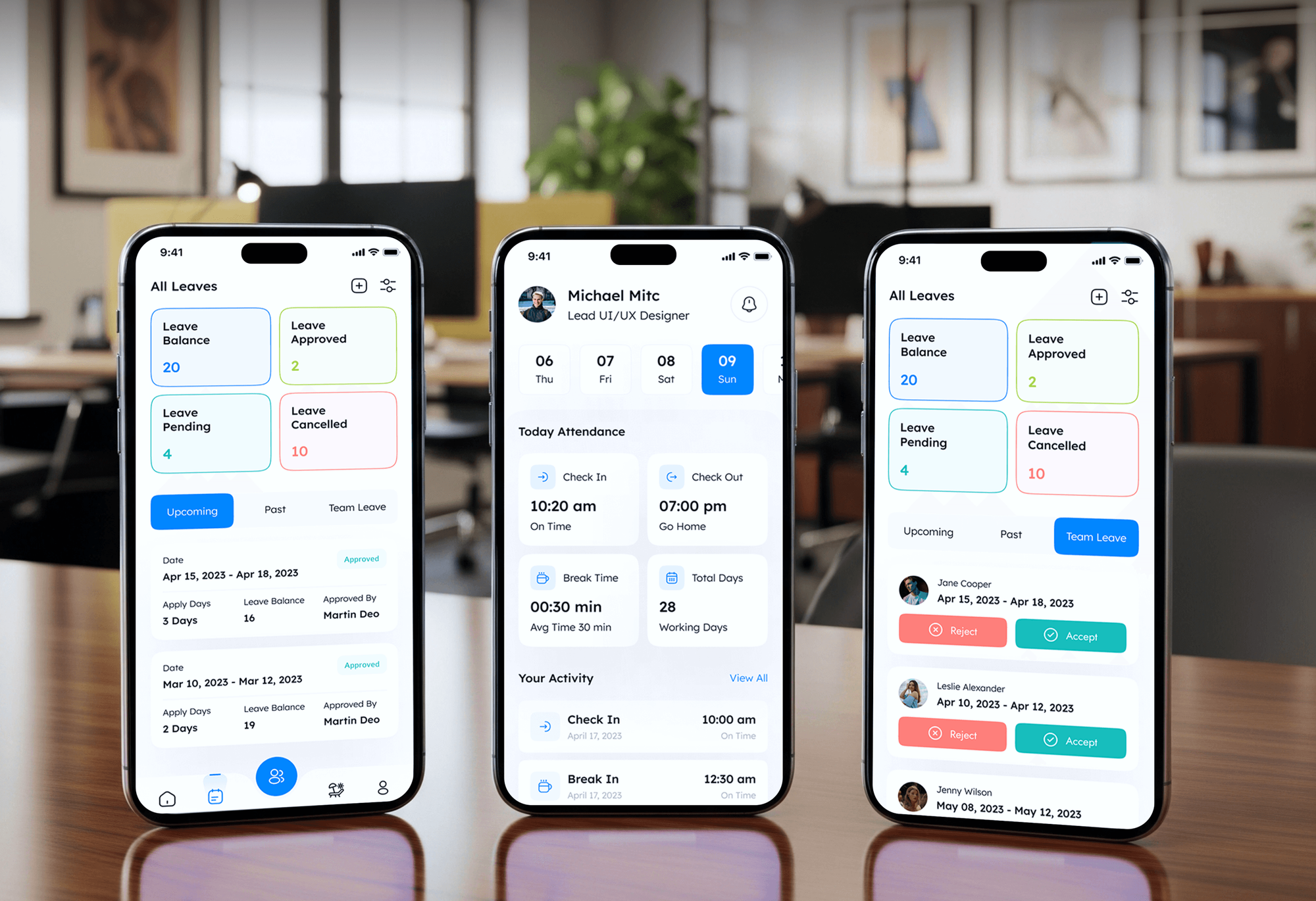
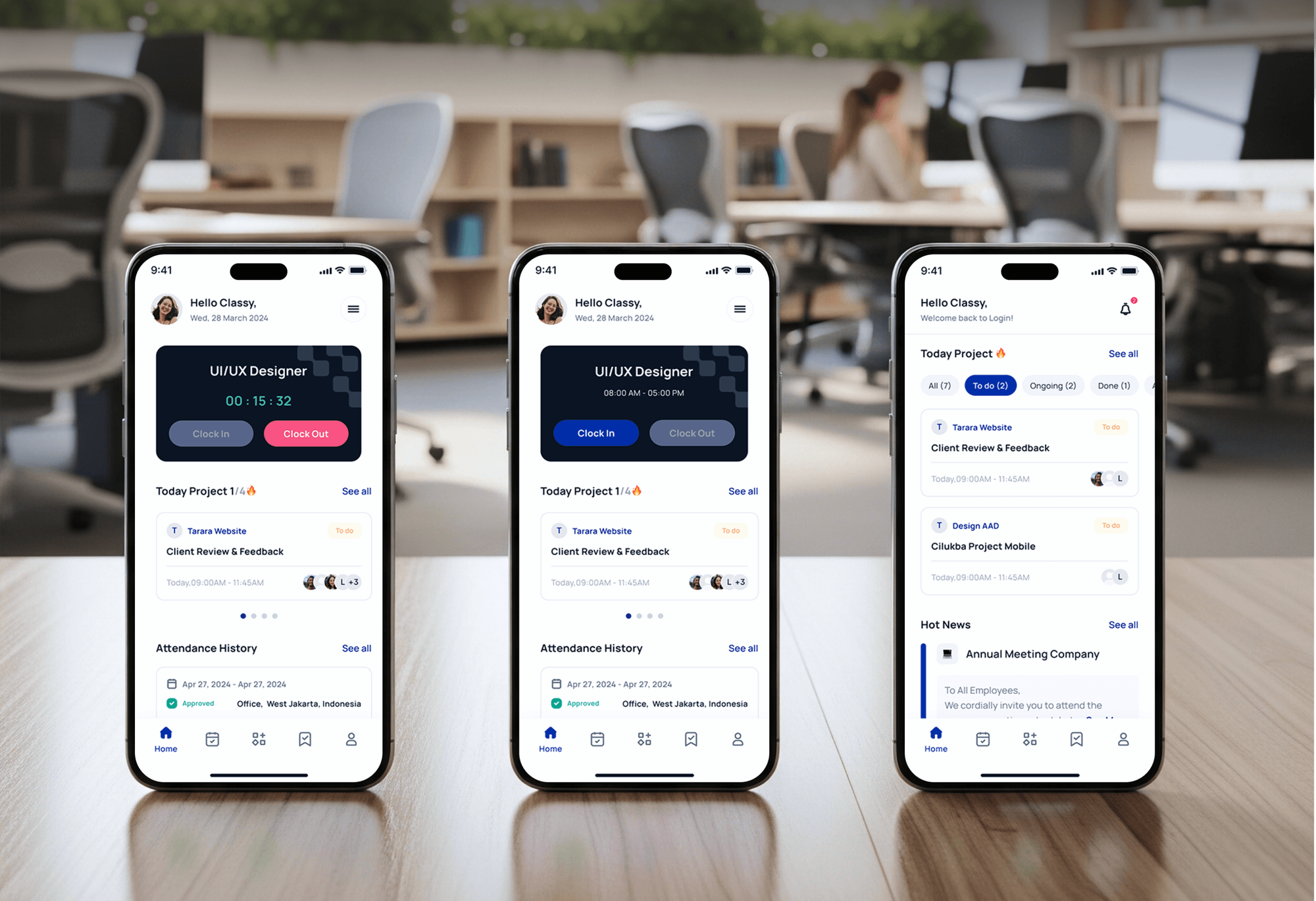
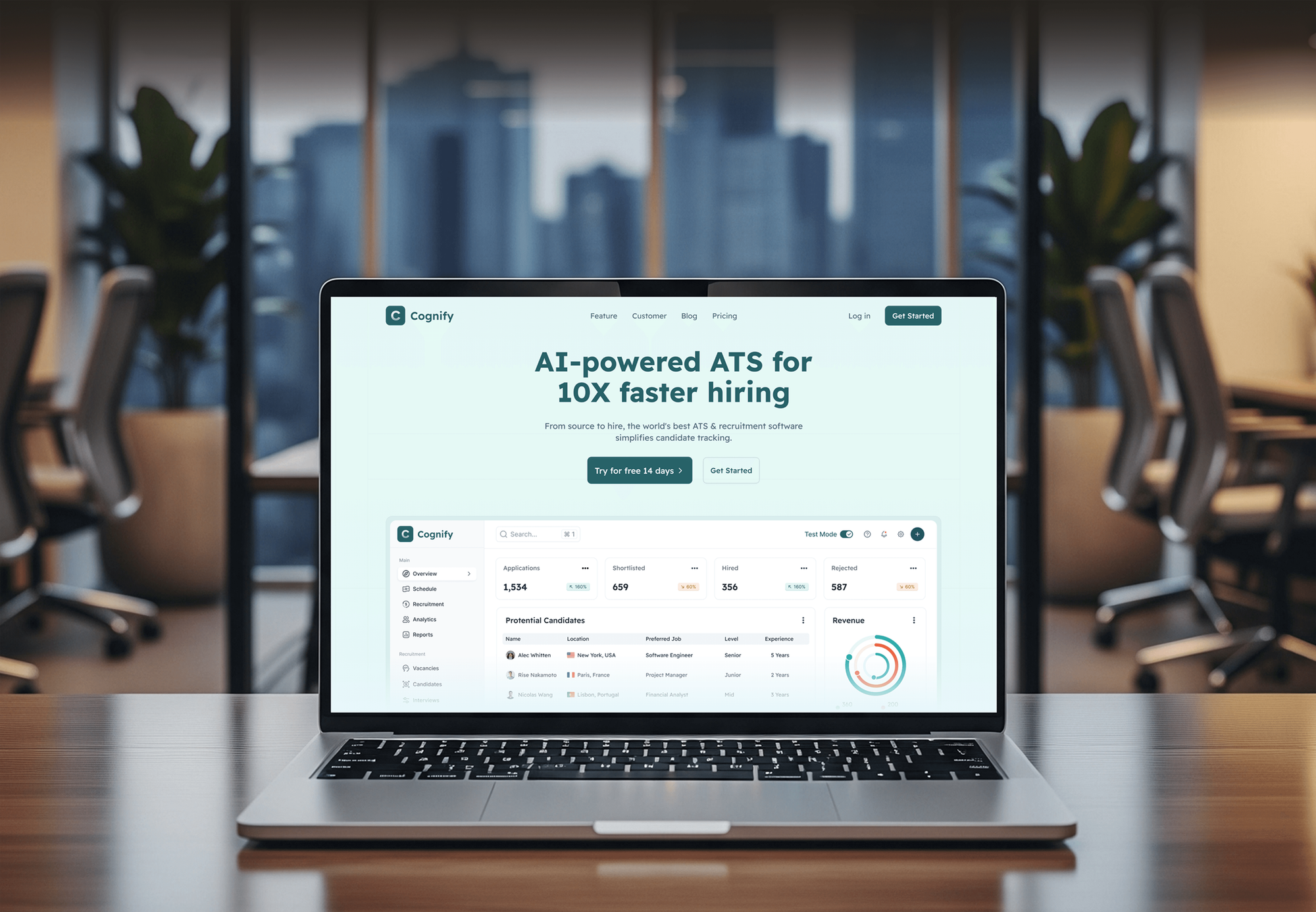
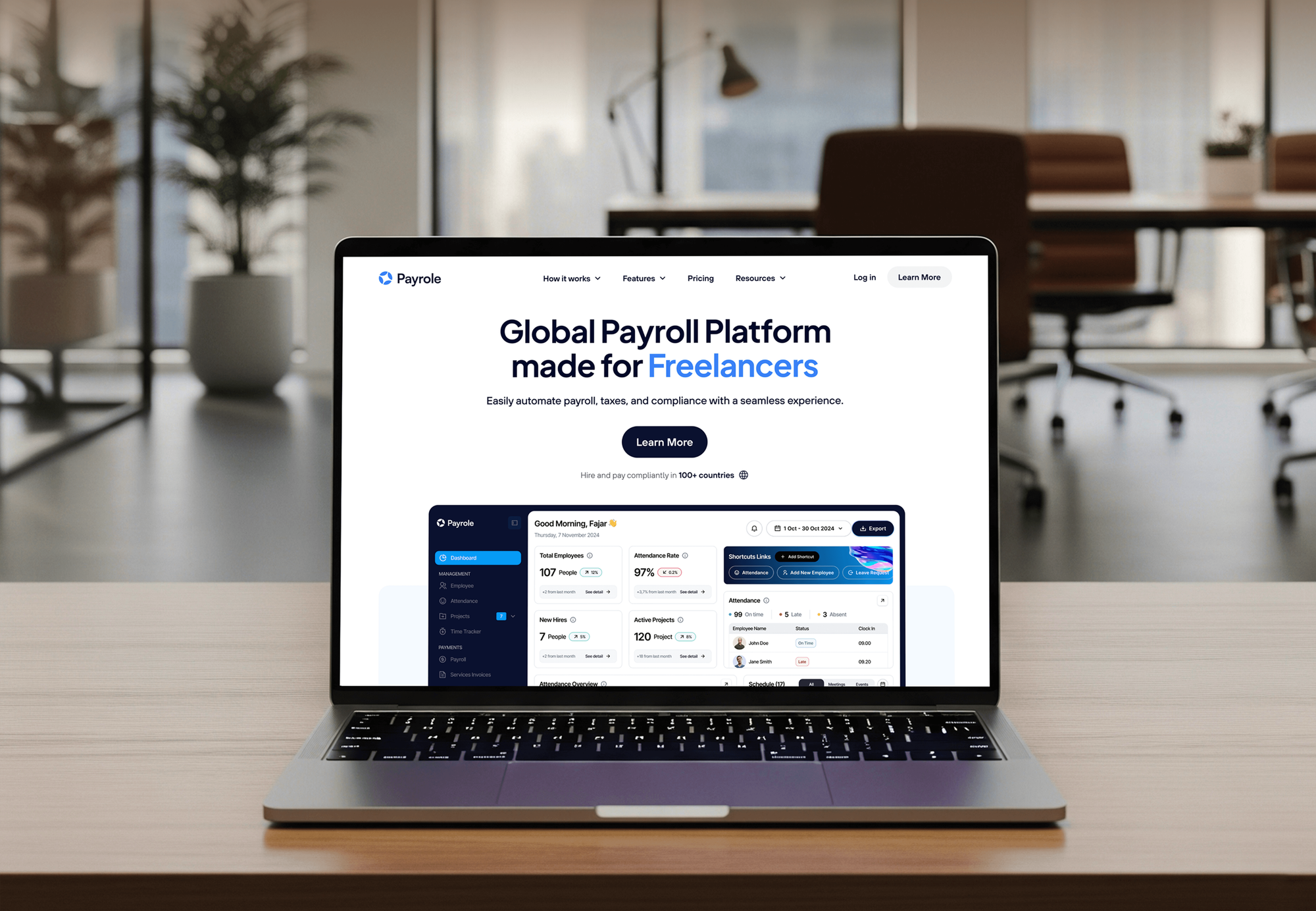
Attendance, staffing, HR, and payroll apps our team designed and built. They show the forms, roles, and approval screens a Power Apps app needs, though they weren't built on Power Apps.
What Our Clients Say
Feedback from teams we have built business apps and software for.
We had a pretty specific idea of what we wanted our website to become, but I wasn’t sure how easily we could explain all of it to a development team. There were quite a few moving parts, and we were working toward a deadline, so I expected a few things to get lost along the way. That never really happened. They understood what we were trying to achieve, kept us updated throughout the process, and got everything ready within the agreed timeline. The final site feels much easier to navigate, works beautifully on mobile, and is noticeably smoother for our customers. It was a huge relief seeing the original idea actually turn into the website we had in mind.
The mobile experience is probably my favourite part of the new site. We had spent a lot of time making sure the desktop version looked right, and the team kept pushing us to think about how everything would actually feel on a phone too. They were right. The navigation is clean, the interactions feel natural, and everything we’ve tested so far works exactly as it should. They also went through the links, forms, integrations, and other details more than once before launch, which I really appreciated. And even after going live, we could still reach out when something came up. The whole process felt friendly, organised, and surprisingly straightforward.
What I appreciate most is that the website is actually easy for us to manage now. We can update content ourselves instead of sending a developer a message every time we need to change something small. They also paid attention to the technical SEO side, which mattered to us because we didn’t want a new website to create problems for the traffic we already had. I’ve probably asked more questions than I should have since launch, but every question has been handled patiently and without any fuss. The team is easy to work with, they explain things clearly, and when we need something changed, they focus on getting it done rather than making the process complicated.
1,250+
Projects shipped
10+
Years of experience
Top 3%
Upwork Top Rated Plus
5 stars
Average review score

Want results like these?
Tell us what you are building. You get a reply within 24 hours on business days, then a written estimate.
Work Culture
Power Apps makes a first version easy. Keeping it working on large lists, through staff turnover and license renewals, is the part we plan for from day one.
A single premium connector can change what every user pays each month. We map connectors to licenses during planning, so the cost of running the app is known.
Power Apps processes 500 records by default for queries it can't delegate. We write delegable formulas from the start, so the app keeps working as your list grows.
Some requests are better served by Microsoft Forms and a list than by an app. If one already covers your case, we'll tell you before we quote.
We build in a development environment and release through solutions. Your staff don't meet unfinished screens on live data, and each release comes with notes on what changed.
Security roles or list permissions decide who sees which records. Managers see their team's requests, and staff see only their own.
Every screen, flow, and data source is documented in plain language. When a builder leaves, the app doesn't leave with them.
Overview
DeveloperLook works as a Power Apps developer for teams that run on Microsoft 365. We pick SharePoint or Dataverse by license cost, build canvas or model-driven apps with approvals, publish them to Teams and phones, and release through test and live environments. Apps start at $1,150, one app takes 2 to 4 weeks, and every app stays in your tenant.
DEVELOPERLOOK
Project facts · Power Apps Developer for Business Apps
Reviewed 7 Oct 2026 by Saimul Islam
Good fit
Microsoft 365 companies on paper forms
Your team already pays for Microsoft 365, yet site checks, leave requests, and expense claims still arrive as paper forms or email attachments.
IT teams with an app backlog
You run IT for a growing company and want to hire Power Platform developer capacity to clear small app requests without coding each one from scratch.
SharePoint list owners hitting limits
Your SharePoint list has grown to thousands of items, and the app on top of it now misses records in searches and filters.
Managers chasing approvals
You want purchase and leave approvals inside Teams, with a clear status for everyone, instead of chasing managers through forwarded emails.
Agencies and Microsoft resellers
Your agency sells Microsoft 365 projects and needs PowerApps developers to deliver client apps under your brand while you keep the relationship.
Not a fit
Budget under $1,150
Your budget is under $1,150 and you need one simple form. Microsoft Forms with a SharePoint list may cover it on its own.
Only Power Automate flows
You only need flows that move files and send alerts, with no app on top. Our Power Automate Consulting Services page covers that work.
Not on Microsoft 365
Your company runs on Google Workspace or Zoho rather than Microsoft 365. Our Low Code Development Services page compares the platforms that fit.
Intranet or document sites
You need an intranet, a document library, or an SPFx web part rather than an app. Our SharePoint Development Services page covers that.
Not sure we're the right fit?
Book a free call or message us. We'll tell you honestly whether we're the right team.
Pricing
These are starting points in USD. Your final price depends on the data source, the number of screens and flows, and your users' licenses, and you get a fixed proposal after a free app review.
For teams replacing one paper form or spreadsheet with a canvas app on standard connectors.
$1,150one-time, USD
For departments that need connected apps on Dataverse with roles, approvals, and tested releases.
$3,200one-time, USD
For companies running a full process on Dataverse or opening it to clients and partners.
$6,500one-time, USD
For Agencies
You own the client relationship. We supply the Power Platform developer work behind it: license reviews, data models, apps, and approval flows. Your client talks to your team, and every app lives in their own Microsoft 365 tenant.
White label: your client only ever sees your brand
Send the client's forms, lists, and the Microsoft licenses their users hold.
You get a data and license plan with a fixed quote for the client.
We build, test, and train, then hand the solution over under your brand.
You run the calls while we build inside the client's tenant.
Each app is priced up front, so your Microsoft project margin holds.
Apps packaged as solutions your team can deploy and maintain later.
Extra Power Apps hands for busy quarters without another hire.
The Right Technology for Your Project
Microsoft's own Power Platform tools, the data sources your apps read and write, the Microsoft 365 apps your staff already use, and how we ship changes safely.
 Power Automate
 Microsoft Dynamics 365
FAQ
Straight answers on Power Apps costs, timelines, licensing, data sources, and who owns the app once it's built.
Saimul IslamFounder & CEO, DeveloperLookStill have questions?
Send a message or book a call with the team.
When you hire Power Apps developer support from DeveloperLook, one canvas app with up to 5 screens starts at $1,150. It runs on a SharePoint list or Excel file. A Dataverse build with up to 3 connected apps and approval flows costs $3,200, and model-driven apps or Power Pages portals start at $6,500. Microsoft licenses are billed separately.
One canvas app usually takes 2 to 4 weeks from the free review to launch. Model-driven apps and Power Pages portals take 5 to 10 weeks, mostly for Dataverse design, security roles, and testing with staff. You see a working demo every week, so changes land while they're still cheap.
It's a specialist who builds business apps on Microsoft Power Apps with Power Fx formulas, connectors, and SharePoint or Dataverse data. The job goes beyond screens: choosing the data source, keeping queries delegable, setting security roles, and moving apps between environments safely. A good one also tells you which licenses your design will need.
Power Apps specialists come from 3 places: in-house citizen developers, Microsoft partner consultancies, and smaller development teams like ours. A power apps development company should show you data models, not just screens, and explain license costs up front. We build canvas and model-driven apps, approval flows, and Power Pages portals for operations teams.
Microsoft Power Apps is usually best when your users already have Microsoft 365 and the app serves internal staff. Traditional developer platforms win for public products, unusual logic, or thousands of outside users, where per-user licenses add up. If your staff live in Teams and SharePoint, Power Apps reaches a working app faster and fits your existing security.
Use SharePoint lists when the app is simple, the data is modest, and you want to stay on standard connectors. Choose Dataverse when you need relationships, security roles, auditing, or model-driven apps. Dataverse is a premium connector, so every user of that app then needs a Power Apps Premium or per app license.
Canvas apps start from a blank screen, where you design every control and write Power Fx formulas. Model-driven apps are generated from Dataverse tables, forms, and views, so the layout is less flexible but data-heavy processes come together faster. Many projects pair a canvas app for field staff with a model-driven app for the back office.
Power Apps licensing depends on the connectors your app uses. Many Microsoft 365 plans let staff run canvas apps on standard connectors such as SharePoint and Excel. Dataverse, SQL Server, and custom connectors are premium, so each user then needs a Power Apps Premium or per app license. We confirm this in the free review.
Delegation limits decide whether a search sees every record or only the first few hundred. When a formula can't be delegated to the data source, Power Apps processes only the first 500 rows by default, or up to 2,000 if raised. We use delegable functions and indexed columns, so filters stay accurate as lists grow.
You do. Every app, flow, and table lives in your Microsoft 365 tenant, packaged as a solution your admin can export or update. We stay on call for fixes and questions for 30 to 90 days, depending on plan. After that, your team can change screens, columns, or flows without calling us.
Saimul IslamFounder & CEO, DeveloperLookStill have questions?
Send a message or book a call with the team.
Free 30-min callGoogle Meet
Book a call
In 30 minutes on Google Meet we walk you through how we would build it, how long it takes and what it costs. Then you get a written estimate.
Calendar not showing? Book on cal.com or send a brief.