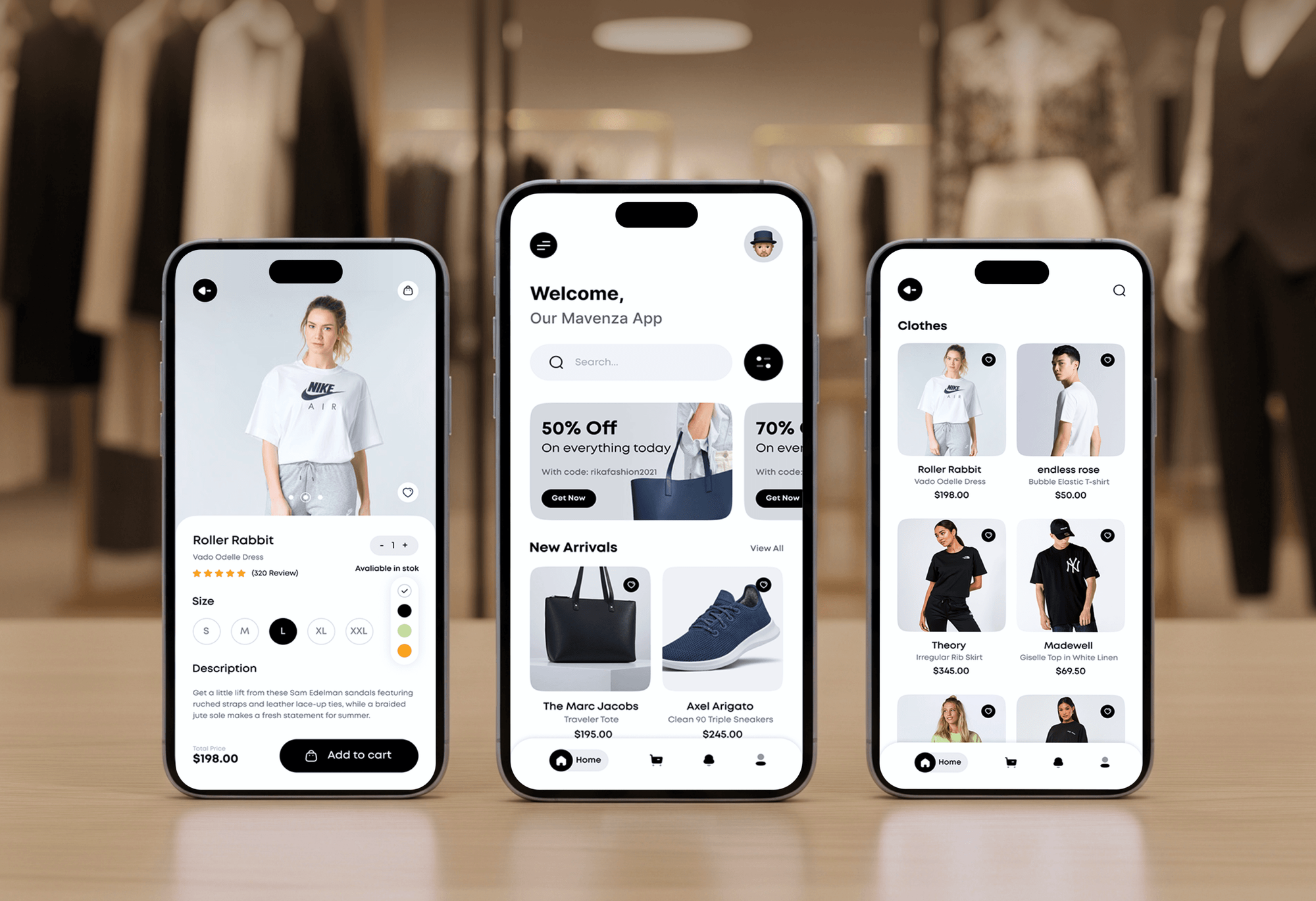
Havenly Furniture Ecommerce Website
- Furniture
- E-commerce
- Dashboard

Shopify checkout blocks, custom fields, and checkboxes built as native extensions. Fixed-scope projects from $500, live in 3 to 10 business days.
100%
Answers saved to each order
100%
Payment methods tested
Teams we have built for:














The Problem
Most requests for a Shopify custom checkout come down to one missing field, checkbox, or message. A full checkout rebuild on Shopify Plus solves that too, but it costs far more than a small change needs.
Missing fields
Customers email to ask about delivery dates and gift notes.
Missing fields
We build the exact field, checkbox, or message your checkout is missing.
Retired code
Your old checkout.liquid edit stopped working when Shopify retired it.
Retired code
We rebuild it as a native extension on Shopify's supported extension points.
App clash
An app you installed adds a block that clashes with your theme.
App clash
We check the apps already in your checkout before placing anything new.
Express pay
Buyers paying with Apple Pay may skip your field entirely.
Express pay
We test each payment method, including express wallets, on real phones.
Your support inbox keeps getting the same emails: can this arrive by Friday, can you add a gift note? Checkout never asked. The checkout.liquid edit that used to collect those answers stopped working when Shopify retired it. An app you installed for something else adds a block that clashes with your theme. And nobody has checked what happens when a buyer pays with Apple Pay and skips your field entirely.
We start with your Shopify plan and the apps already in your checkout, because those decide what's possible. Then we build Shopify checkout blocks and fields as native extensions and place them on the right step. Every answer is saved to the order. We test each payment method, including express wallets. You get the one field you needed, not a rebuilt checkout.
Only the fields you need
We build the exact field, checkbox, or message your checkout is missing, and nothing extra.
Native Shopify extensions
Built on Shopify's supported extension points, the same system that replaced checkout.liquid.
Tested on real phones
Every extension is checked on mid-range phones and with each payment method before launch.
Our Shopify Checkout Customization Process
You see every change on a development store before your customers do. Our Shopify checkout extensions go live only after test orders pass on every device and payment method.
We check your plan, the apps already in your checkout, and the exact fields or messages you want. If Shopify's free Checkout Blocks app already covers your case, we'll tell you before we quote. Otherwise you get a fixed price and a written list of changes.
Projects We've Built
A selection of Shopify and ecommerce stores we've built for clients. Checkout work starts with knowing how the whole store fits together.


What's Included
Every project covers a plan check, placement, build, testing across payment methods, and a handover your team can manage in the checkout editor.
Compare Options
Shopify's free Checkout Blocks app covers simple content and fields on Plus. Paid checkout apps add features for a monthly fee. Here's where each one fits, and where custom extensions earn their price.
| Feature | DeveloperLookBest fit | Checkout Blocks app | Third-party checkout app |
|---|---|---|---|
| Upfront cost | From $500, one-time | Free, made by Shopify | Monthly app fee |
| Time to set up | 3 to 10 business days | Minutes, no code needed | Minutes to a few hours |
| Custom fields | Any field and validation you need | Common field types | Limited to the app's options |
| Conditional logic | Any rule, including your own data | Wide range of display rules | Varies by app |
| Works with other apps | Tested with your installed apps | Maintained by Shopify | Can clash with other apps |
| Testing before launch | Real orders, every payment method | You test it yourself | You test it yourself |
| Code ownership | Your extension, your code | Shopify's app | The vendor's app |
| Support after launch | 14 days included | Shopify Help Center | Vendor support desk |
What Our Clients Say
Feedback from ecommerce teams we have built stores, checkouts, and integrations for.
We were getting plenty of traffic, but far too many people were leaving at checkout. The buying process had simply become too complicated. The team took the time to understand where customers were dropping off, then rebuilt the checkout flow and cleaned up the shopping experience. What I really appreciated was that they didn’t just make the store look better, they actually solved the problems that were costing us sales. The whole store feels faster, simpler, and much easier to buy from now. Exactly what we needed.
We had a different kind of problem. People were visiting the store, adding products to their carts, and then disappearing before they finished the order. We had tried a few apps and made changes here and there, but nothing really seemed to solve the bigger issue. The team went through the shopping experience with us and pointed out things we hadn't really noticed ourselves. They cleaned up the cart and checkout flow, made the mobile experience much smoother, and helped us make the store feel easier to shop. I’m not going to pretend we fixed everything overnight, but it finally feels like the store is helping the sale instead of getting in the way of it.
Our old store was making it way too difficult for people to find products. We had a large catalogue, but the search, filters, and mobile navigation were frustrating customers. The team completely changed how the store handled product discovery and made the experience much easier to use on mobile. I was especially impressed by how much thought went into the customer journey rather than just the visual design. They understood what we were trying to achieve and turned it into a store that actually feels built for our customers. We’re genuinely proud of the result.
1,250+
Projects shipped
10+
Years of experience
Top 3%
Upwork Top Rated Plus
5 stars
Average review score
1,250+
Projects shipped
10+
Years of experience
Top 3%
Upwork Top Rated Plus
5 stars
Average review score

Want results like these?
Tell us what you are building. You get a reply within 24 hours on business days, then a written estimate.
Work Culture
Checkout is the one page where every mistake costs a sale. These are the habits we bring to every checkout project, from a single checkbox to a full cleanup.
Fields inside the checkout steps need Shopify Plus, so we confirm your plan before we quote. If you're not on Plus, we'll show you what the cart and thank you pages can do instead.
Shopify's Checkout Blocks app and checkout editor are free and cover a lot. We only write a custom extension when they can't do what you need.
Each extra field is one more thing a buyer fills in before paying. We push back on fields you don't need and keep the ones that save your team a follow-up email.
Express wallets can skip parts of checkout, so a required field can go unseen. We place test orders with each payment method you offer before launch.
Checkout UI extensions run in Shopify's own sandbox instead of injecting scripts into the page. Your checkout stays about as fast as Shopify built it.
We build on the extension APIs that replaced checkout.liquid, not on workarounds. When Shopify updates checkout, your fields are built to keep working.
Overview
DeveloperLook builds Shopify checkout blocks, custom fields, and checkboxes as native Shopify checkout extensions, plus disclaimers, delivery notes, and thank you page content. We use Shopify's free Checkout Blocks app when it fits and build custom extensions when it doesn't. Projects start at $500, most go live in 3 to 10 business days, and you own the code.
DEVELOPERLOOK
Project facts · Shopify Checkout Customization
Reviewed 28 Sep 2026 by Saimul Islam
Good fit
Plus stores missing one checkout field
Your checkout needs a delivery date, a gift message, or a terms checkbox, and a full rebuild would be overkill for one field.
Stores outgrowing the Checkout Blocks app
You set up Shopify's free Checkout Blocks app, but now you need a rule it can't handle or answers saved to a specific order field.
Stores hit by the checkout.liquid shutdown
Your old checkout.liquid edits and scripts stopped working when Shopify retired them, and you need those fields rebuilt as extensions.
Non-Plus stores with post-purchase needs
You're not on Shopify Plus, but you want delivery details, a survey, or reorder links on your thank you and order status pages.
Agencies with Shopify Plus clients
Your agency keeps getting checkout requests from Plus clients, and you need extension work done under your brand without hiring for it.
Not a fit
Custom payment or shipping logic
You need custom payment, shipping, or discount logic. That's Shopify Functions work, and our Shopify Plus Checkout Customization service covers it.
Not on Shopify Plus
You're not on Shopify Plus but need a field inside the checkout steps. Shopify doesn't allow that, so a cart page field is the honest alternative.
Logo and colors only
You only need a logo, colors, or a simple text block. Shopify's free checkout editor and Checkout Blocks app cover that without a $500 project.
Post-purchase offers
You want offers shown after the purchase to raise order value. Our Shopify Post-Purchase Upsell Development page covers that work.
Not sure we're the right fit?
Book a free call or message us. We'll tell you honestly whether we're the right team.
Pricing
These are starting points in USD. Your final price depends on how many extensions you need and which apps touch checkout, and you get a fixed proposal after a free review.
For Agencies
You own the client relationship and the store. We supply the checkout extension work your team doesn't do every week: fields, checkboxes, blocks, and checkout.liquid rebuilds. Everything ships under your brand, tested on real orders.
White label: your client only ever sees your brand
Send store access, the fields or blocks needed, and your client's deadline.
You get a fixed price, a placement plan, and a delivery date before committing.
We build, test, and document the extensions under your brand, then hand them over.
Send store access, the fields or blocks needed, and your client's deadline.
You get a fixed price, a placement plan, and a delivery date before committing.
We build, test, and document the extensions under your brand, then hand them over.
The Right Technology for Your Project
We build on Shopify's own checkout tools, then test with every payment method and tracking pixel your store runs.
 Shopify PlusCheckout UI ExtensionsCheckout BlocksShopify CLI
 React
React JavaScript
 Node.js
 Remix
Remix GraphQL
 PayPal
 Apple Pay
 Google Pay
 Google Analytics (GA4)
 Google Tag Manager
 Meta (Pixel, Conversions API)
 Chrome DevTools
Related Services
Most checkout projects also touch Plus checkout logic, post-purchase offers, or payments. These are the services clients add most often.
This page
Shopify Checkout Customization
Pairs with the 6 services around it
FAQ
Straight answers on cost, what Shopify allows on each plan, and how to add fields, checkboxes, notes, and disclaimers.
Saimul IslamFounder & CEO, DeveloperLookStill have questions?
Send a message or book a call with the team.
Our checkout customization starts at $500 for one extension, such as a single field, checkbox, or disclaimer. Up to 5 extensions cost $1,450. A full cleanup with up to 10 extensions, thank you page blocks, and app conflict fixes is $3,450. You get a fixed price after a free checkout review, and there are no monthly app fees.
You customize Shopify checkout in three layers: branding in the checkout editor, content blocks, and checkout UI extensions for fields and logic. Branding works on every plan. Blocks and fields inside the information, shipping, and payment steps need Shopify Plus. The thank you and order status pages accept blocks on any plan. If you need to edit the checkout page in Shopify beyond branding, start by confirming your plan.
Yes, but only through Shopify's supported tools, because checkout.liquid and injected scripts have now been retired. Every plan can change branding and add blocks to the thank you and order status pages. Shopify Plus stores can also add custom fields, checkboxes, and content blocks inside the checkout itself. Payment, shipping, and discount logic is Shopify Functions work, which is a separate project.
Subscription apps like Recharge, Skio, and Shopify Subscriptions use Shopify's selling plans, so checkout already shows the plan and recurring price. Many also add their own checkout UI extension for delivery frequency or subscription terms. We step in when that block sits in the wrong place or clashes with another app. We can also add extra fields for your subscribers.
On Shopify Plus, we add a checkout UI extension with a text field and save the note to the order. Your team sees it in the order admin and, if you want, on packing slips. On other plans, the cart page note field does the same job before buyers reach checkout.
On Shopify Plus, a checkout UI extension adds the checkbox, and it can stop the buyer from paying until it's ticked. We use it for terms acceptance, gift wrap, or age confirmation, and save the answer to the order. Marketing opt-in is already built into Shopify's checkout settings. On other plans, a required checkbox on the cart page is the usual workaround.
On Shopify Plus, the fastest way is a content block from Shopify's free Checkout Blocks app, placed above the pay button. We build a custom block when the disclaimer depends on the cart, such as age-restricted products or delays to certain regions. On any plan, you can also show it on the thank you and order status pages.
That line isn't part of checkout at all. It's theme text on your product and cart pages, and you can change or remove it in minutes. In your Shopify admin, open your theme's Edit default theme content menu and search for calculated at checkout. Clear or rewrite the text, then save. If a shipping app adds its own estimate, we check that app's settings instead.
Shopify's one-page checkout puts contact, delivery, and payment on a single page instead of three separate steps. It's the default layout, and you can switch to three-page checkout in the checkout editor. Checkout UI extensions work in both layouts, so your fields and blocks don't need rebuilding if you switch. We check placement in both before launch.
Checkout customization helps conversions when it removes a reason to hesitate, like a missing delivery date or an unclear return policy. It hurts when it adds work, because every extra field is one more thing to fill in before paying. We keep only what your customers or your team need, and we test real orders so nothing blocks payment.
Saimul IslamFounder & CEO, DeveloperLookStill have questions?
Send a message or book a call with the team.
Free 30-min callGoogle Meet
Book a call
In 30 minutes on Google Meet we walk you through how we would build it, how long it takes and what it costs. Then you get a written estimate.
Calendar not showing? Book on cal.com or send a brief.