
Slash commands and shortcuts
Commands and message shortcuts that open the right form or fetch a record without leaving Slack.

For operations teams and SaaS companies: a Slack app or bot that turns requests, approvals, and alerts into buttons your team can act on, from $750.
3X
Faster approvals and handoffs
15+ hrs
Status chasing saved monthly
How your project runs
Teams we have built for:














The Problem
It shows up as threads nobody closes, alerts nobody owns, and the same status question asked three times a day in different channels.
01 · Lost approvals
Requests sit in threads until someone remembers to reply.
Approve and reject buttons record each decision inside the message.
02 · Noisy alerts
Raw alerts scroll past and nobody takes ownership.
Alerts arrive with acknowledge and assign buttons, so one person owns each.
03 · App hopping
People open three tools just to check a status.
A Home tab shows open requests and their status inside Slack.
04 · Customer installs
Customers want your app, but unlisted apps face tight limits.
We build to Slack Marketplace rules, so customer installs aren't throttled.
Someone posts a purchase request in a channel, and it sits there until the right manager scrolls past it. Your monitoring tool drops raw alerts into another channel, and three people look while nobody takes it. A customer asks your sales team for a Slack integration, and the honest answer is a webhook URL. Each answer means opening another app, finding the record, and coming back to reply. By Friday nobody can say which requests were approved.
We start with the requests and alerts your team already handles in Slack, then build Slack app flows that turn each one into a message with buttons. Approvals record who decided and when, alerts get an owner, and a Home tab shows what is still open. Decisions happen in the message, not in a thread that scrolls away.
Buttons instead of thread replies
Approve, assign, or reject from the message itself, with the decision saved.
Scopes your security team approves
We list every OAuth scope and why it's needed before anything is installed.
Built for Slack's API rules
Rate limits, the 3-second reply rule, and Marketplace terms planned in from the start.
Our Slack App Development Services Process
You approve every message, button, and OAuth scope before code starts, and one team pilots the app in a real channel before everyone gets it.
We map the requests, approvals, and alerts your team handles in Slack today, and the systems behind them. You get a list of commands, buttons, and messages with a fixed quote. If Workflow Builder already covers it, we'll tell you before we quote.
What's Included
Commands, approvals, alerts, a Home tab, and the connections to your systems, built on Bolt and hosted where your security team can see it.
Compare Options
Slack's Workflow Builder handles simple forms well, and a no-code connector moves data fast. A freelance Slack bot developer is another route. Here is where each fits custom approvals.
| Feature | DeveloperLookBest fit | Workflow Builder | No-code connector |
|---|---|---|---|
| Up-front planning | Request map and scope list first | Build as you go | Template based |
| Custom logic | Any rule your process needs | Branches and conditions | Limited to its steps |
| Data from your systems | Two-way through your APIs | Through connected steps | Prebuilt app actions |
| Setup speed | 2 to 8 weeks | Same day for simple forms | Hours for simple flows |
| Rate limit handling | Queued and retried in code | Handled by Slack | Handled by the vendor |
| Customer distribution | Marketplace-ready apps | Your workspace only | Your account only |
| Monthly cost | Hosting only after handoff | Included in paid plans | Per task or seat |
| Code ownership | Your code and app config | No code to own |
Projects We've Built
HR, attendance, and team management software we designed and built. None is a Slack app, but each runs the requests and approvals teams often move into Slack.
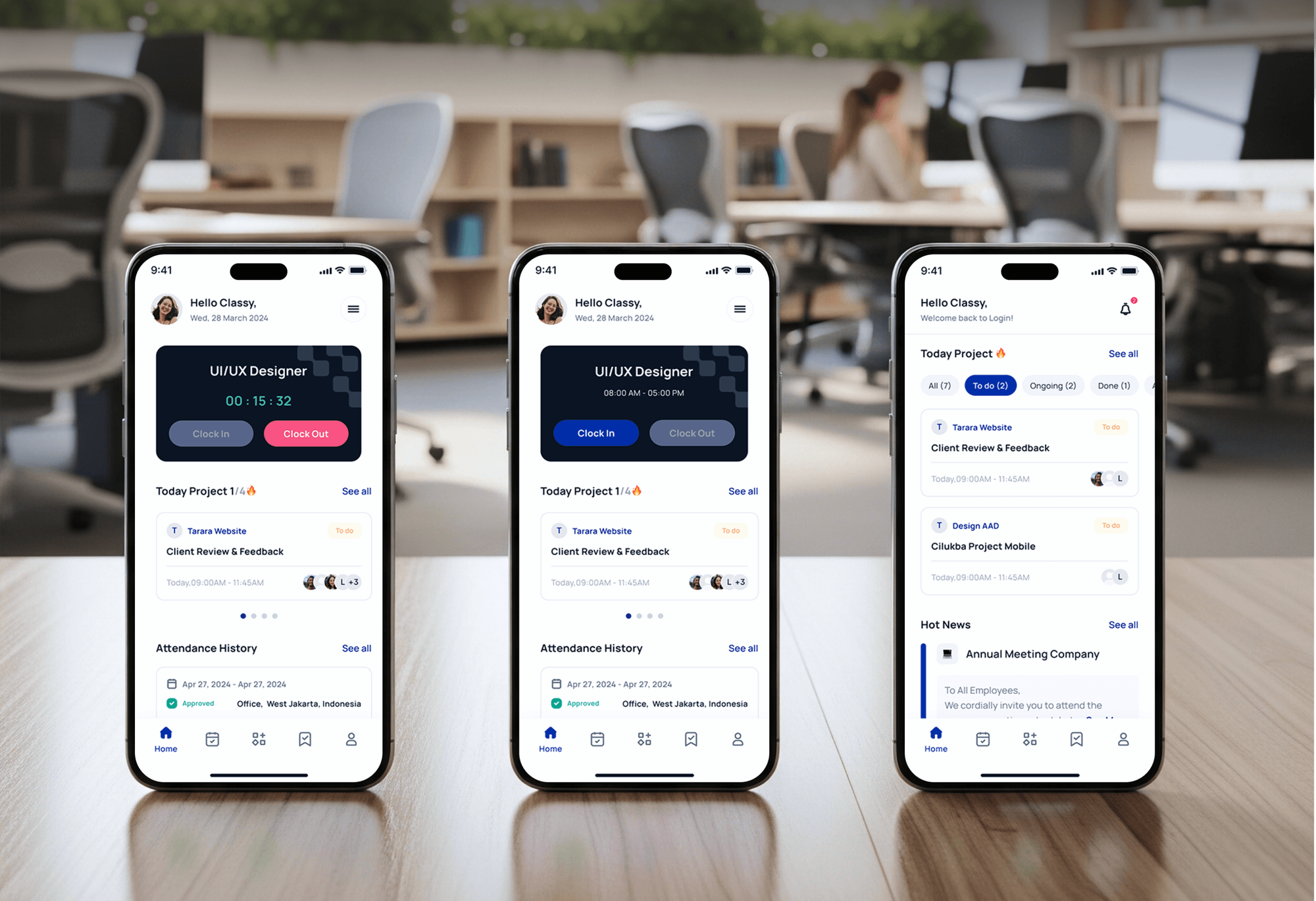
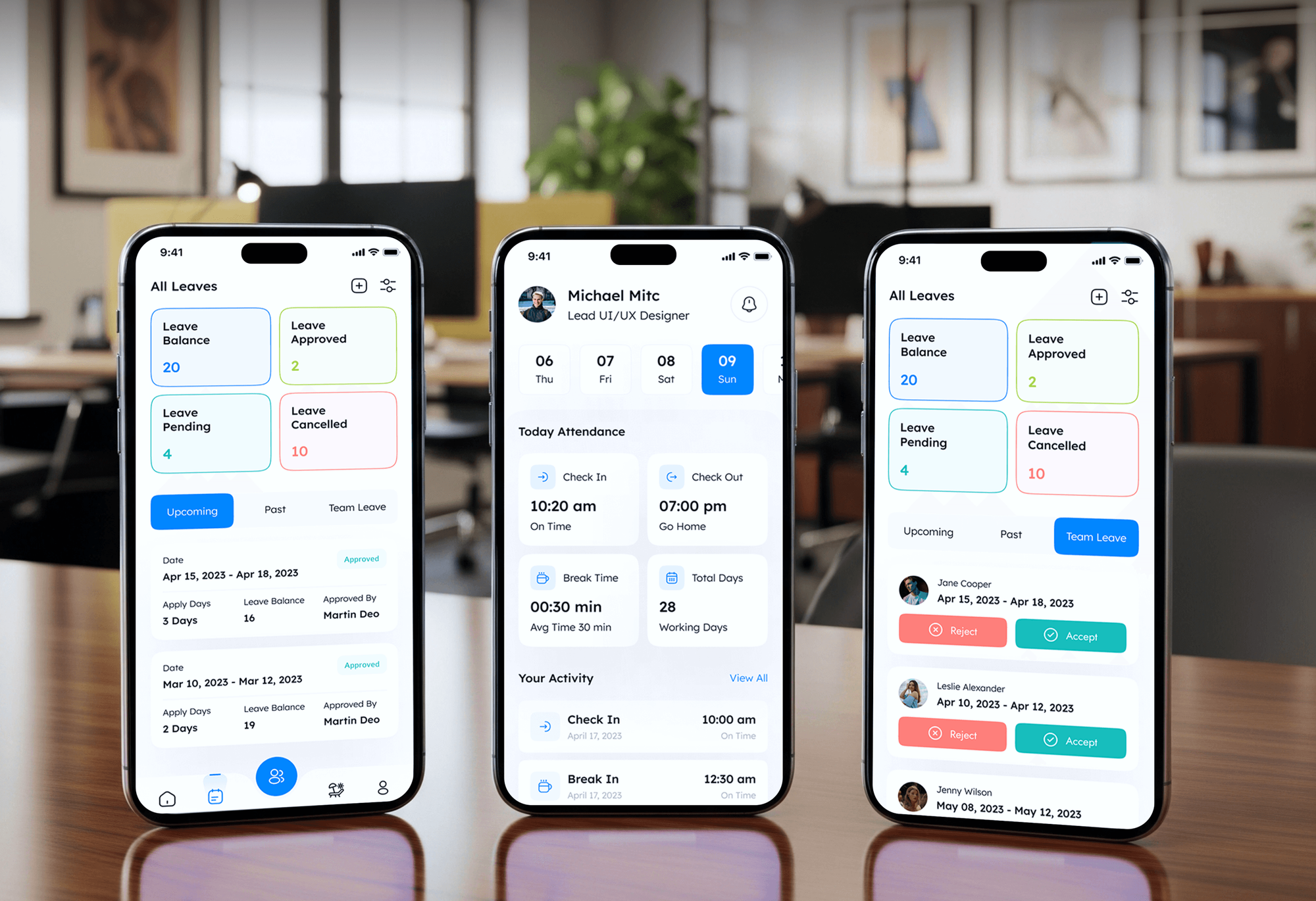
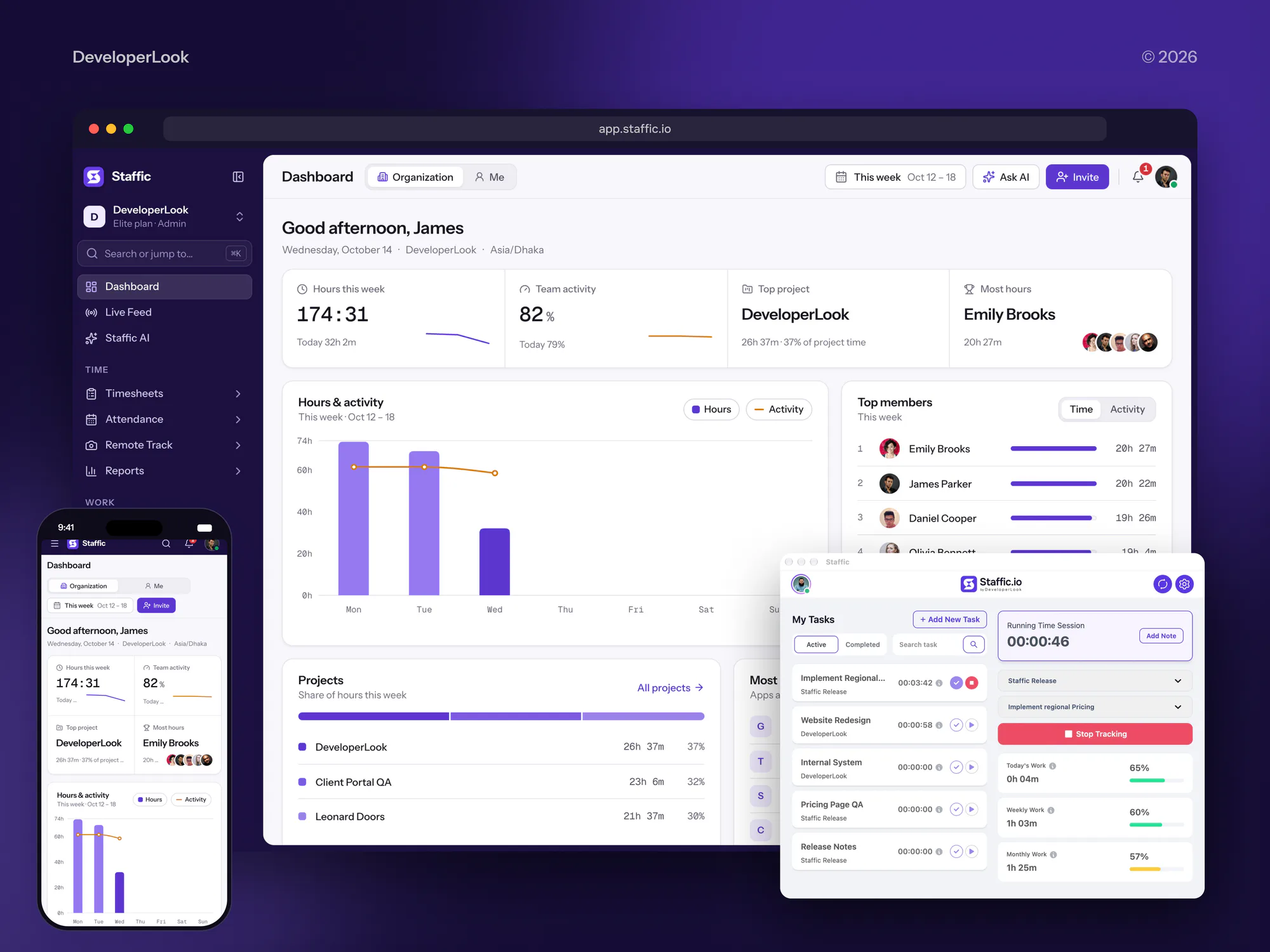

What Our Clients Say
Feedback from teams we have built websites, apps, and integrations for.
We had a pretty specific idea of what we wanted our website to become, but I wasn’t sure how easily we could explain all of it to a development team. There were quite a few moving parts, and we were working toward a deadline, so I expected a few things to get lost along the way. That never really happened. They understood what we were trying to achieve, kept us updated throughout the process, and got everything ready within the agreed timeline. The final site feels much easier to navigate, works beautifully on mobile, and is noticeably smoother for our customers. It was a huge relief seeing the original idea actually turn into the website we had in mind.
The mobile experience is probably my favourite part of the new site. We had spent a lot of time making sure the desktop version looked right, and the team kept pushing us to think about how everything would actually feel on a phone too. They were right. The navigation is clean, the interactions feel natural, and everything we’ve tested so far works exactly as it should. They also went through the links, forms, integrations, and other details more than once before launch, which I really appreciated. And even after going live, we could still reach out when something came up. The whole process felt friendly, organised, and surprisingly straightforward.
What I appreciate most is that the website is actually easy for us to manage now. We can update content ourselves instead of sending a developer a message every time we need to change something small. They also paid attention to the technical SEO side, which mattered to us because we didn’t want a new website to create problems for the traffic we already had. I’ve probably asked more questions than I should have since launch, but every question has been handled patiently and without any fuss. The team is easy to work with, they explain things clearly, and when we need something changed, they focus on getting it done rather than making the process complicated.
1,250+
Projects shipped
10+
Years of experience
Top 3%
Upwork Top Rated Plus
5 stars
Average review score

Want results like these?
Tell us what you are building. You get a reply within 24 hours on business days, then a written estimate.
Work Culture
A Slack app talks to your whole company several times a day. These habits keep it useful, quiet when it should be, and safe to approve.
We ask for the OAuth scopes each feature needs and nothing extra. Security reviews go faster, and the app can see less if a token leaks.
Each message leads with the decision needed and the one number that matters. People act on short messages and ignore long ones.
One team uses the app for a week before everyone else gets it. Their complaints fix the wording before the company sees it.
We queue and retry calls so busy hours don't hit Slack's limits. Your alerts keep arriving on the day you need them most.
Each command, approval, and alert is priced in the proposal before we start. Extra requests get a quote first, so the agreed total holds.
The app config, code, and hosting sit in your accounts. Your team can change commands or scopes later without us.
Overview
DeveloperLook does Slack app development for operations teams and SaaS companies. We build slash commands, approval flows with buttons and modals, actionable alerts, Home tabs, and links to your systems on Bolt. Apps start from $750, take 2 to 8 weeks, and run in your own accounts.
DEVELOPERLOOK
Project facts · Slack App Development Services
Reviewed 22 Oct 2026 by Saimul Islam
Good fit
Operations teams buried in requests
Your team handles purchase, access, or refund requests in Slack threads, and approvals get lost when someone forgets to reply.
Engineering teams with noisy alerts
Your monitoring tools post raw alerts into a channel, and nobody can acknowledge or assign them without opening other apps.
SaaS companies adding Slack
Your customers want your product's updates in Slack, and you need an app they can install from the Slack Marketplace.
Companies on Slack Enterprise
Your company runs an Enterprise org with many workspaces, and the app must install once for everyone and pass your security review.
Agencies with Slack-first clients
Your agency's clients run on Slack and ask for custom bots, and you need a Slack bot developer who can build and host them.
Not a fit
Simple forms or reminders
You need a simple form, reminder, or welcome message. Slack's own Workflow Builder handles that on paid plans without custom code.
Community on Discord
Your members gather in a Discord server, not a Slack workspace. Our Discord Bot Development Services page covers bots for community servers.
Sync with no Slack step
You only need records copied between two tools, with nobody acting in Slack. Our Workflow Automation Services page covers that kind of work.
Training AI on Slack data
You want to collect Slack messages to train an AI model. Slack's rules for apps don't allow that, so we turn the work down.
Not sure we're the right fit?
Book a free call or message us. We'll tell you honestly whether we're the right team.
Pricing
These are starting points in USD. Your final price depends on your flows, connected systems, and who installs the app, and you get a fixed proposal after a free request review.
For one workspace that needs alerts or quick commands from one system.
$750one-time, USD
For teams moving approvals and requests out of threads and into structured flows.
$2,100one-time, USD
For SaaS companies whose customers install the app in their own workspaces.
$4,900one-time, USD
For Agencies
You own the client relationship. We supply the Slack engineering: request mapping, Bolt code, hosting, and Marketplace preparation, all under your agency's name and installed in your client's own workspace.
White label: your client only ever sees your brand
Send the client's main requests, alerts, and the systems behind each one.
You get the flow list, scope list, and a fixed price within a few days.
We pilot, roll out, and document, then hand everything over under your brand.
You keep the client calls while we build and host the app.
A fixed scope per flow and dates your client can plan around.
Engineers who know Block Kit, scopes, rate limits, and Marketplace rules.
Offer Slack apps without hiring a Slack platform specialist.
The Right Technology for Your Project
The Slack platform tools, languages, connected systems, and hosting we use to build Slack apps your security team can approve.
 Slack
Slack Node.js
 TypeScript
 Python
 Java
Java Salesforce
 HubSpot
 Zendesk
 AWS
AWS Google Cloud
 Docker
 PostgreSQL
FAQ
Straight answers on Slack app cost, timelines, how Slack bots work, and distributing apps to customers.
Saimul IslamFounder & CEO, DeveloperLookStill have questions?
Send a message or book a call with the team.
Slack app development with us starts at $750 for an internal bot with up to 3 commands and alerts from one system. Workflow apps with approvals, modals, and a Home tab are $2,100, and Marketplace-ready apps start at $4,900. You get a fixed quote after a free request review.
An internal bot usually takes 2 to 3 weeks, and approval apps with modals and a Home tab take 4 to 8 weeks. Marketplace apps then wait for Slack's review. Slack's guide allows up to 10 business days for the first check and up to 10 weeks of functional review for a new app.
A Slack bot is an app that talks with people in Slack through messages, commands, and buttons, using its own bot token. It isn't the same as Slackbot, which is Slack's built-in assistant. A custom bot stays installed when the person who added it leaves, because the token belongs to the app.
You create a Slack app from a manifest, either in the app settings or with the Slack CLI. The manifest lists the app's name, scopes, commands, and event subscriptions. Installing it to your workspace then gives the app a bot token for Slack's Web API.
Give the app the chat:write scope, then post from your system with Slack's chat.postMessage method. Slack allows about one message per second per channel, so busy systems need batching. We add buttons to each alert, so someone can acknowledge or assign it without leaving the message.
Register the command in the app's settings, then have your server acknowledge each request within 3 seconds, which Slack requires. Longer work finishes in the background and posts the result back to the channel. Bolt handles that acknowledgment for you, which is one reason we build on it.
You make it with Block Kit, Slack's layout framework for messages, modals, and the Home tab. A message holds up to 50 blocks and a modal up to 100. When someone clicks a button, Slack sends your app an interaction, and the app updates the message to show the decision.
Build a Slack bot as a distributed app with an OAuth install flow, then list it in the Slack Marketplace. Slack's 2025 terms make the Marketplace the channel for commercial distribution, and unlisted commercial apps get far lower limits on reading message history. Submission needs 10 or more active workspaces.
Yes, a Slack app can run an AI agent in Slack's agent messaging experience, which new apps use since June 2026. The app needs the assistant:write scope and can stream replies as they're written. Slack's MCP server and Real-time Search API are limited to Marketplace and internal apps, so we settle the app type first.
You do. The app is created in your Slack account, the code lives in your Git repository, and hosting runs in your cloud account. Every plan includes 30 to 90 days of support. We also hand over the app manifest, so your team can change scopes or commands later.
Saimul IslamFounder & CEO, DeveloperLookStill have questions?
Send a message or book a call with the team.
Free 30-min callGoogle Meet
Book a call
In 30 minutes on Google Meet we walk you through how we would build it, how long it takes and what it costs. Then you get a written estimate.
Calendar not showing? Book on cal.com or send a brief.