
User flows and wireframes
Every journey mapped from first open to goal, so screen count and scope are clear before visual design.

For founders and product teams who want app screens tested with real users before the build: flows, UI, and a prototype your developers can build from.
100%
Key screens prototyped before code
5
Real users test your flows
Teams we have built for:














The Problem
Most app design problems surface late: when developers find missing screens, when Android users meet iPhone patterns, or when the first users can't find the main button.
01 · Missing states
No empty, loading, or error screens in the design file.
Every screen is drawn in its empty, loading, and error states.
02 · Platform habits
Android users get an iPhone layout with a new status bar.
Screens follow Apple's guidelines on iOS and Material 3 on Android.
03 · Thumb reach
Key buttons sit where thumbs can't reach them.
Main actions sit within thumb reach, checked on small and large phones.
04 · Guesswork
Developers wait for answers, then guess the gaps.
Named components and specs let developers build without guessing.
Your designer sent 24 beautiful screens. Then your developers opened the file. There's no empty state for a new user, no error screen for a failed payment, and no design for the keyboard covering the sign-up form. The Android version is the iPhone layout with a different status bar. Buttons sit where thumbs can't reach. Every gap becomes a question, every question becomes a guess, and the guesses ship. Three weeks into the build, you're paying developers to wait for screens.
We start with the flows, not the visuals: every path a user takes, including the ones where something goes wrong. Then we design each screen for the platform it runs on and prototype it on a real phone. 5 people from your audience test it before anyone writes code. Your developers get a file they can build from, not a gallery they have to interpret.
Every state designed
Empty, loading, error, and offline screens are part of the scope, not an afterthought.
Tested before code
5 people from your audience try the prototype, and the places they stall get fixed first.
Built for both platforms
iOS and Android each get their own navigation, controls, and gestures where users expect them.
Our Mobile App Design Process
You see and approve each step: the flows first, then wireframes, screens, and a prototype tested with real users before anything goes to developers.
In a free discovery call, you walk us through your users, the app's main job, and any screens or brand assets you already have. We map the user flows and agree which journey to design and test first. You approve the flow map and screen list.
What's Included
Flows, wireframes, final screens for iOS and Android, a tested prototype, and a component library, handed to your developers with specs and support.
Compare Options
A template kit puts screens on the page fastest, and a freelancer often costs less. A mobile app design agency adds user testing, platform conventions, and a state for every screen.
| Feature | DeveloperLookBest fit | Freelancer | Template kit |
|---|---|---|---|
| User testing | 5-user test in every plan | Sometimes, at extra cost | None |
| iOS and Android conventions | Designed per platform | Often one shared layout | Depends on the kit |
| Empty and error states | Every screen covered | Often left out | A few included |
| Design system | Components and tokens | Varies by designer | Included, but generic |
| Developer handoff | Specs, assets, and Q&A | Figma link only | You prepare it |
| Time to first screens | About 1 week | A few days | Same day |
| Upfront cost | From $950 | Often lower | Lowest |
| File ownership | Your Figma workspace | Agree it in writing | Kit license applies |
Projects We've Built
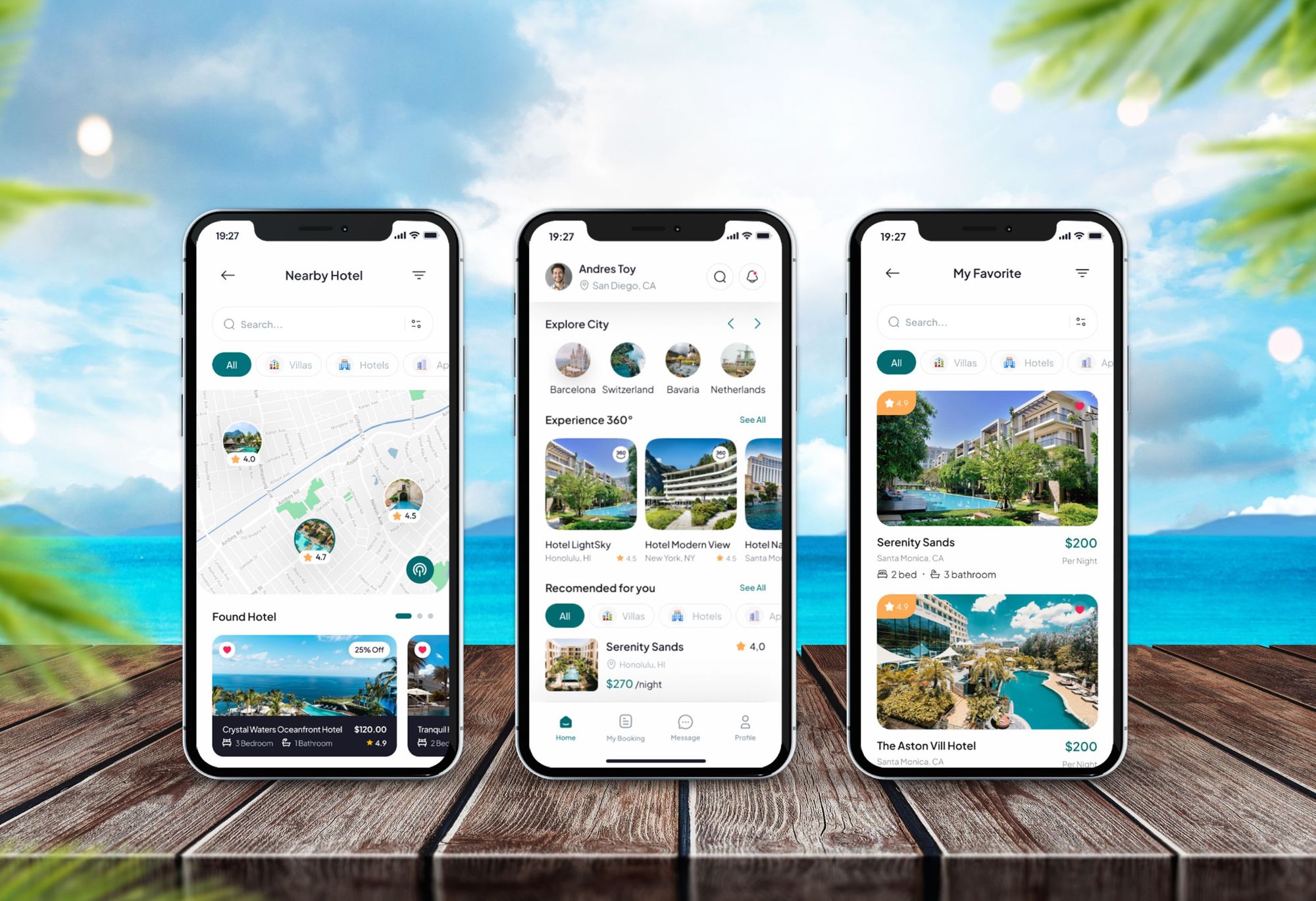
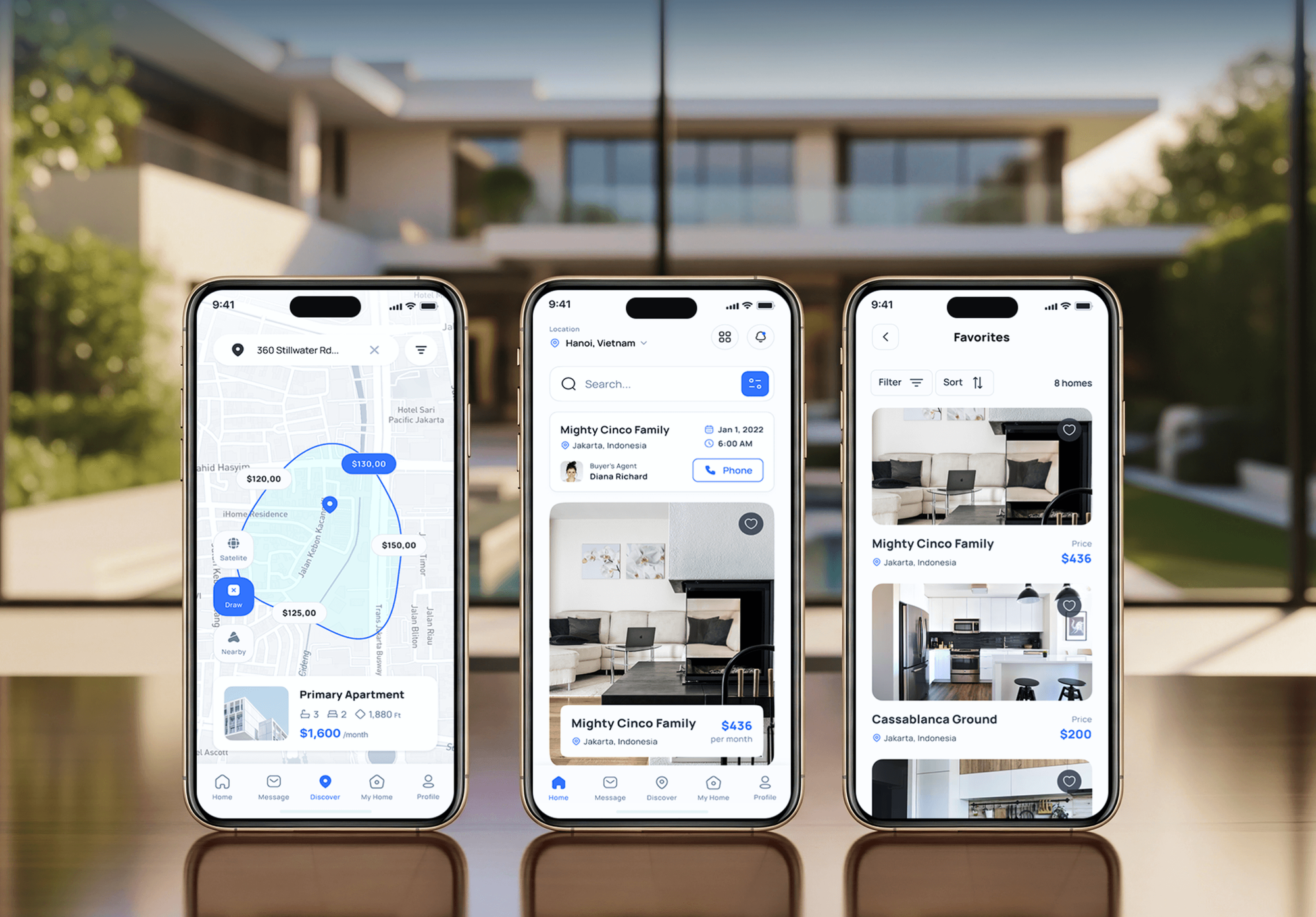
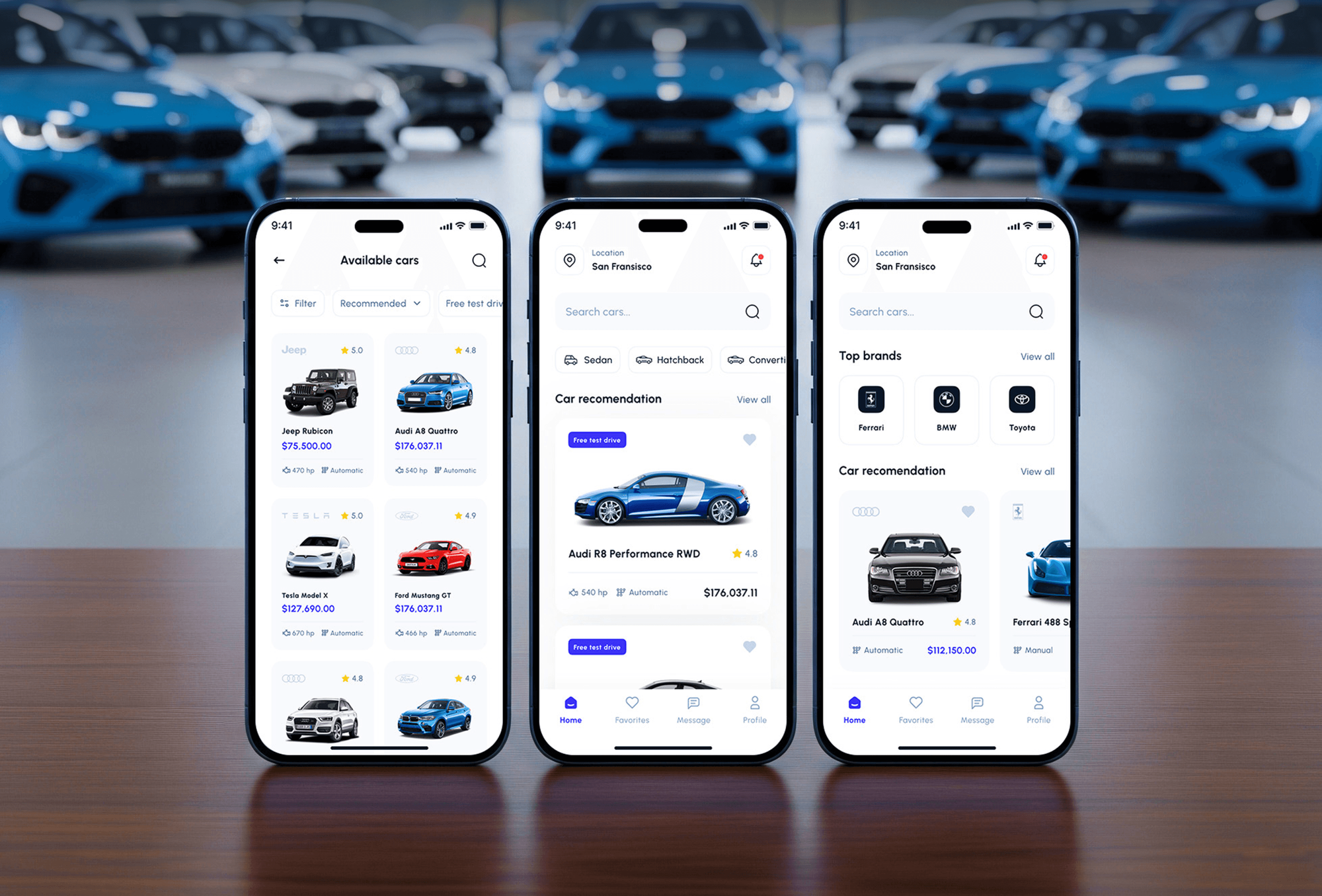
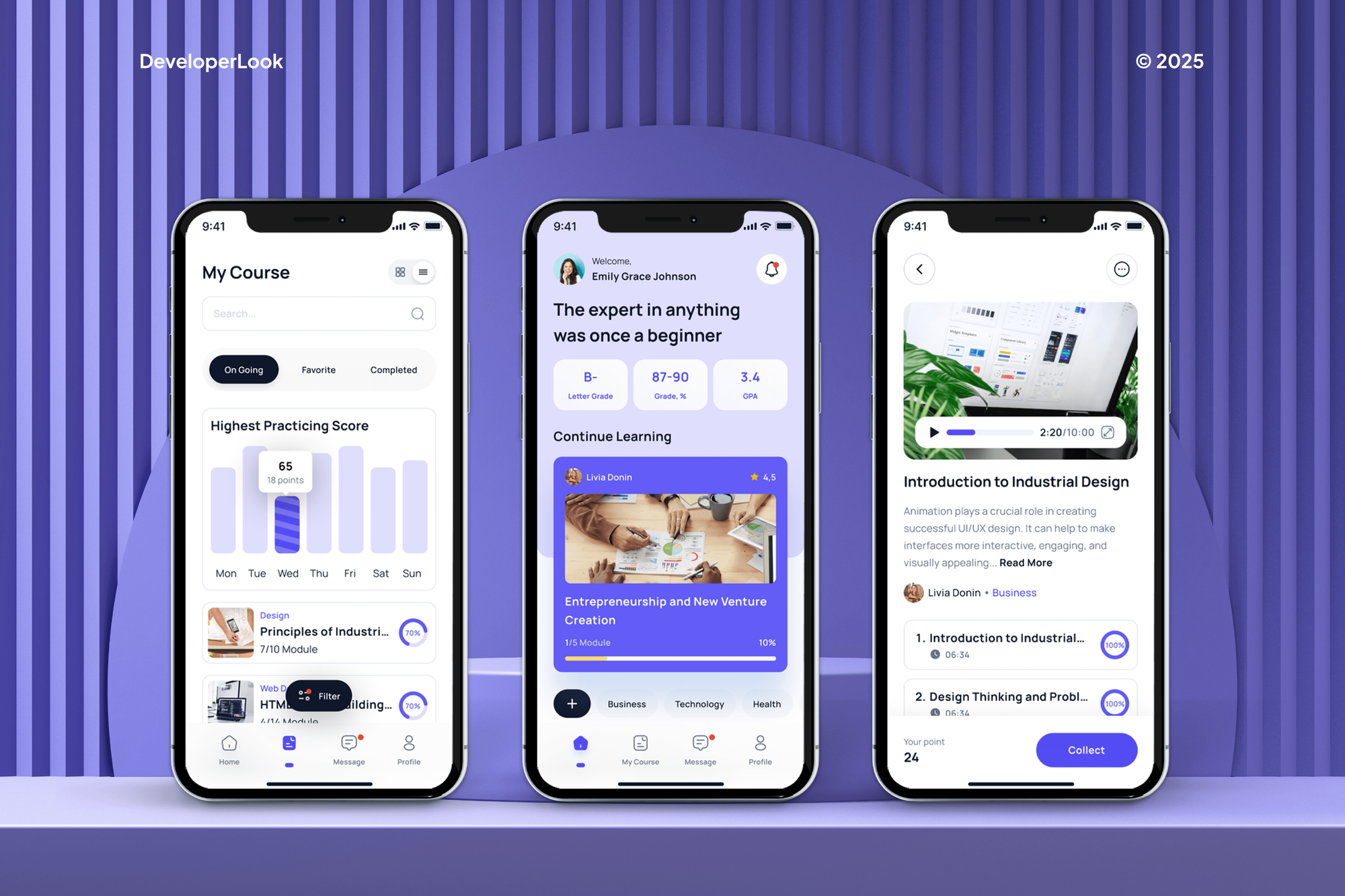
App design work from our portfolio: vacation rental, real estate, automotive, and e-learning apps, from user flows to final screens and dashboards.
What Our Clients Say
Feedback from teams we have designed and built digital products for.
We had a pretty specific idea of what we wanted our website to become, but I wasn’t sure how easily we could explain all of it to a development team. There were quite a few moving parts, and we were working toward a deadline, so I expected a few things to get lost along the way. That never really happened. They understood what we were trying to achieve, kept us updated throughout the process, and got everything ready within the agreed timeline. The final site feels much easier to navigate, works beautifully on mobile, and is noticeably smoother for our customers. It was a huge relief seeing the original idea actually turn into the website we had in mind.
The mobile experience is probably my favourite part of the new site. We had spent a lot of time making sure the desktop version looked right, and the team kept pushing us to think about how everything would actually feel on a phone too. They were right. The navigation is clean, the interactions feel natural, and everything we’ve tested so far works exactly as it should. They also went through the links, forms, integrations, and other details more than once before launch, which I really appreciated. And even after going live, we could still reach out when something came up. The whole process felt friendly, organised, and surprisingly straightforward.
What I appreciate most is that the website is actually easy for us to manage now. We can update content ourselves instead of sending a developer a message every time we need to change something small. They also paid attention to the technical SEO side, which mattered to us because we didn’t want a new website to create problems for the traffic we already had. I’ve probably asked more questions than I should have since launch, but every question has been handled patiently and without any fuss. The team is easy to work with, they explain things clearly, and when we need something changed, they focus on getting it done rather than making the process complicated.
1,250+
Projects shipped
10+
Years of experience
Top 3%
Upwork Top Rated Plus
5 stars
Average review score

Want results like these?
Tell us what you are building. You get a reply within 24 hours on business days, then a written estimate.
Work Culture
Good app design is decided by the habits behind it. These are the ones that keep your screens buildable, testable, and yours.
We map every journey before drawing a single screen. Scope and screen count are agreed up front, so the design fee doesn't grow halfway through.
Our designers work beside Swift, Kotlin, Flutter, and React Native developers. You don't get layouts that look good in Figma and cost double to code.
We review every prototype on actual phones, small and large. Tap targets, text sizes, and thumb reach get checked where your users will feel them.
Contrast, text scaling, and screen reader labels are planned from the wireframes. Adding them after launch means redesigning screens your users already know.
The Figma files live in your team's workspace from day one. You keep every screen, component, and prototype, whoever builds the app.
If a feature won't earn its screens in the first release, we'll say so. A smaller first version is cheaper to design, build, and test.
Overview
DeveloperLook offers mobile app design for startups and product teams building iOS and Android apps. We map user flows, design every screen and state, build a clickable prototype, and test it with real users before handoff. Design starts at $950 for one core flow, a full app takes 4 to 10 weeks, and you own the Figma files.
DEVELOPERLOOK
Project facts · Mobile App Design Services
Reviewed 8 Oct 2026 by Saimul Islam
Good fit
Founders before the first build
You have an app idea and a build budget, and you want the main flow tested with real users before you pay developers.
Product teams fixing a confusing app
Your app reviews mention confusing navigation, and you need a redesign that fixes it without losing the users who already know the app.
Teams with their own developers
Your developers are ready in Swift, Kotlin, Flutter, or React Native, and they need finished screens and components to build from.
Businesses adding a customer app
Your customers already use your website, and you need app screens that carry the brand but follow iOS and Android habits.
Agencies short on app designers
You sold an app project and need screens, prototypes, and user tests delivered under your brand, on your client's deadline.
Not a fit
Browser-first product
Your product is a dashboard or portal used mostly in a browser. Our Web App Design Services page covers browser-first products.
Design and build in one
You want one team to design and build the app on one fixed price. Our Mobile App Development Company page covers the full build.
Budget under $950
Your budget is under $950, or a ready-made UI kit covers your screens. If a kit is enough, we'll tell you before we quote.
Mobile game art
You're designing a mobile game with characters, levels, and animated scenes. A game art studio will serve you better than an app design team.
Not sure we're the right fit?
Book a free call or message us. We'll tell you honestly whether we're the right team.
Pricing
These are starting points in USD. Your final price depends on the number of screens, user roles, and test rounds, and you get a fixed proposal after a free discovery call.
For founders who need one key journey designed and tested before a build. About 2 weeks.
$950one-time, USD
For a first release on iOS and Android with every screen designed and tested. About 4 to 6 weeks.
$2,600one-time, USD
For apps with several user roles, dark mode, or a team adding features every month. About 6 to 10 weeks.
$4,900one-time, USD
For Agencies
You own the client relationship. We supply the app design work: flows, screens for iOS and Android, prototypes, and usability tests, delivered in your Figma workspace under your brand and handed to whichever developers your client uses.
White label: your client only ever sees your brand
Send the app idea, the audience, any screens you have, and the client's deadline.
You get a screen list, a test plan, and a fixed price you can resell.
We design, test, and hand over the Figma files under your agency's name.
We present through you and work inside your agency's Figma team.
Fixed screen counts and review dates your client signs off on.
Mobile designers who know iOS and Android conventions lead every project.
Hand us one flow, a full app, or a complete design system.
The Right Technology for Your Project
Figma for screens and prototypes, each platform's own design system, and a handoff shaped to the framework your developers build with.
 Figma
Figma Adobe XD
 Sketch
 Framer
 Flutter
 React Native
FAQ
Straight answers on design costs, timelines, iOS and Android differences, and handoff to developers.
Saimul IslamFounder & CEO, DeveloperLookStill have questions?
Send a message or book a call with the team.
Mobile app design at DeveloperLook starts at $950 for one core flow: wireframes, up to 10 final screens, a prototype, and a 5-user test. To design a mobile app in full for iOS and Android, plans start at $2,600 for up to 35 screens. Apps with several user roles and a full design system start at $4,900, and you get a fixed quote after a free discovery call.
Spend enough on design to test your main flows before the build, because that's the cheapest place to change your mind. A screen redesigned in Figma takes hours, while the same change after development can take a sprint. On our pricing, a full app design from $2,600 costs well under a store-ready build. Spend more when your app has several roles, payments, or heavy onboarding.
Designing a mobile app takes about 2 weeks for one tested core flow and 4 to 10 weeks for a full app. A first release with up to 35 screens usually needs 4 to 6 weeks, covering wireframes, UI, a prototype, and a usability test. Apps with several roles, dark mode, and a full design system take 6 to 10 weeks. Quick feedback from your side keeps each review round to a few days.
Drawing a few good-looking screens is easy; designing an app that new users understand without help is hard. The difficulty is in the details: small screens, thumbs instead of a mouse, two platforms with different habits, and states like offline or a failed payment. That's why professional mobile application design services test prototypes with real users. The first few sessions usually expose the biggest gaps.
A mobile app designer cuts rework by settling flows, screens, and edge cases before developers start. They turn a feature list into a tested journey, spot where users stall, and give developers named components instead of loose pictures. On the projects we run, that means fewer questions during sprints. A good mobile ux design agency will also tell you which features to leave out of version one.
Yes, where each platform's users have habits, and no where your brand is concerned. Apple's Human Interface Guidelines and Google's Material 3 differ in navigation, back behavior, pickers, and system sheets. We keep your colors, type, and layout logic shared, then adapt controls and navigation per platform. Cross-platform builds in Flutter or React Native can follow both, so the design file shows each variant.
They include user flows, wireframes, a design system, accessibility checks, and usability tests, not only finished screens. UX work decides what each screen does and in what order; UI work decides how it looks and feels on the device. We also design onboarding and the screens before permission prompts, because iOS shows its own notification request once, and a denied request is hard to win back.
The best mobile product design agency for your consumer app is one whose shipped apps you'd happily use yourself. Ask each mobile app design company for downloadable apps, a usability test plan, and examples of empty and error states. Check that they design for both iOS and Android habits. We'd rather you compare us on those points than on a ranking list.
Yes, our handoff works for any team building in Swift, Kotlin, Flutter, or React Native. Components and color, type, and spacing tokens are named the way developers structure code, and every screen has specs and exported assets. We answer questions during your plan's support window, and the App Design System plan adds design checks on test builds.
Yes, the Figma files live in your team's workspace from the first day, and you own every screen, component, and prototype. If you don't have a Figma account yet, we set one up in your name. Fonts and icon sets keep their own licenses, so we list each one in the handoff. Design support then covers your questions for 1 to 6 weeks, depending on plan.
Saimul IslamFounder & CEO, DeveloperLookStill have questions?
Send a message or book a call with the team.
Free 30-min callGoogle Meet
Book a call
In 30 minutes on Google Meet we walk you through how we would build it, how long it takes and what it costs. Then you get a written estimate.
Calendar not showing? Book on cal.com or send a brief.